Stop Feeding Your LLM Stale Context: Build a RAG Pipeline Into Your MERN App

There's a moment every MERN dev eventually hits when they wire an LLM into their Express backend and realise: this thing has no idea what my app's actual data looks like. So you end up stuffing documents into a system prompt, blowing through your context window at 3am, and getting confidently wrong answers. RAG — Retrieval-Augmented Generation — is the fix, and you can wire it directly into Express without touching the rest of your stack.
What's RAG, Actually?
RAG is simple in concept: instead of asking an LLM "hey, answer this based on everything you know", you first retrieve the relevant pieces of data from your own database, then hand those to the LLM as context. The model isn't guessing — it's working from your actual documents.
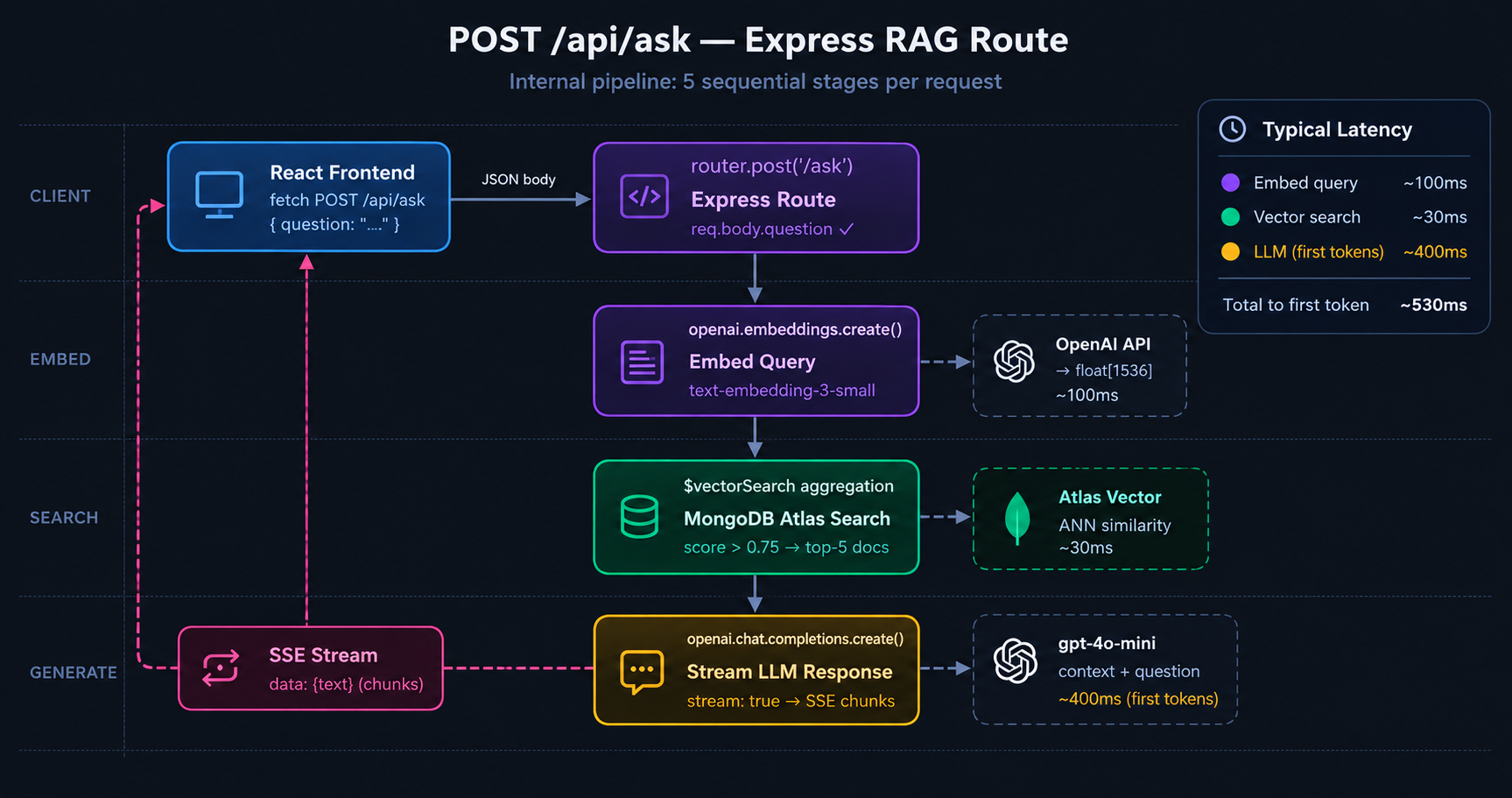
The flow looks like this: a user sends a question → you embed that question into a vector → you run a similarity search against your stored document embeddings → you grab the top results → you build a prompt that includes those results as context → the LLM generates an answer grounded in your data.
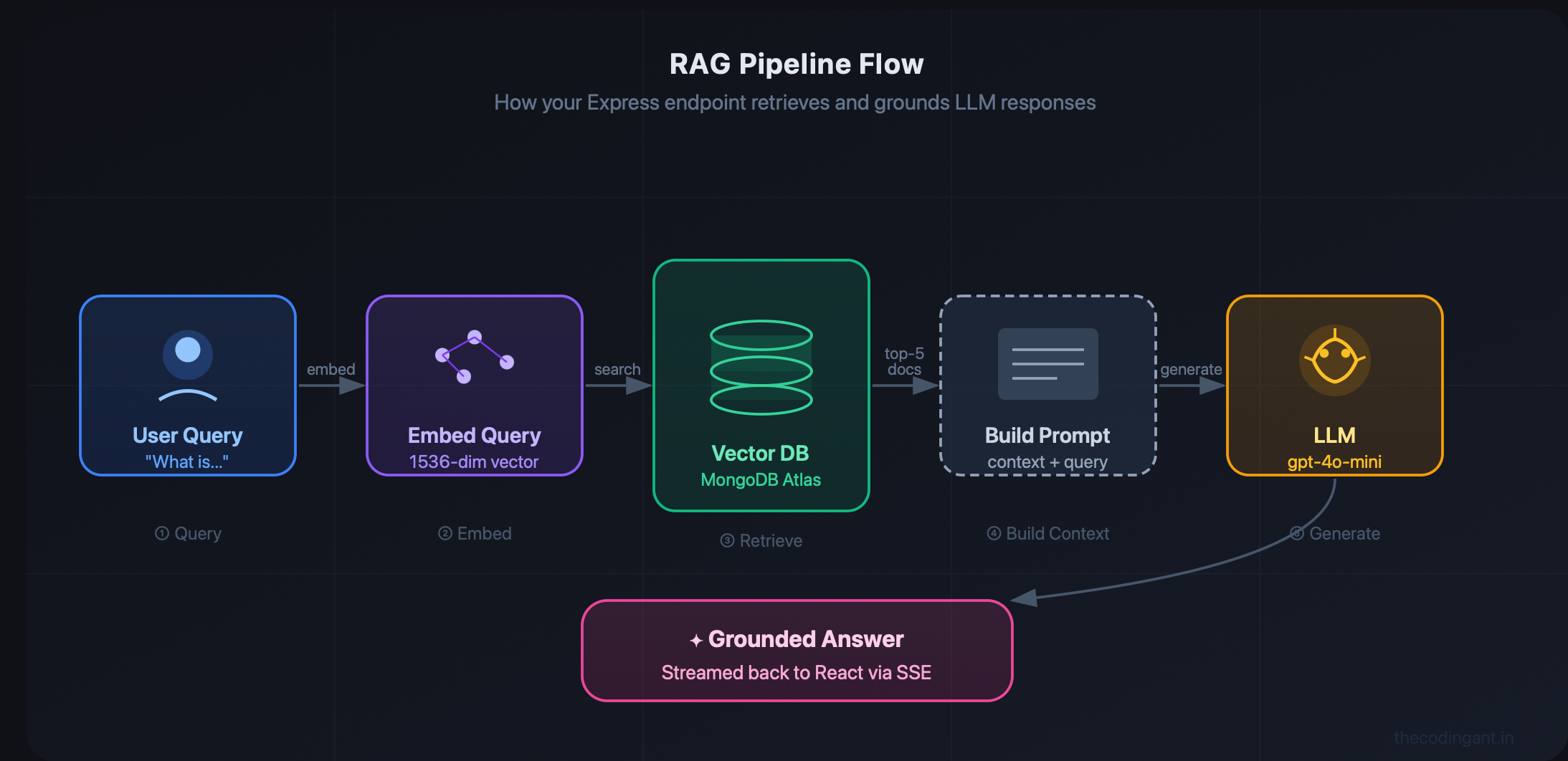
This matters for MERN devs because: your MongoDB already has the data, Atlas now ships with vector search built in, and your Express API is already the right place to handle all of this logic. No Python microservice. No new database to manage. Just your stack, doing more.
The Stack We're Using
You don't need to add anything radical here:
MongoDB Atlas with Vector Search enabled (the index setup takes about 5 minutes in the Atlas UI)
Node.js / Express for the API layer
OpenAI SDK for embeddings (
text-embedding-3-small) and generation (gpt-4o-miniis more than good enough)React on the frontend — we'll stream the response so it feels instant
That's it. Same stack, smarter app.
Step 1: Embedding and Storing Your Documents
Whenever you add content to MongoDB — blog posts, product descriptions, support docs, internal knowledge base entries — you also need to store its vector embedding alongside it. This is the "augmentation" part of RAG.
// utils/embedDocument.js
import OpenAI from 'openai';
import { Document } from '../models/Document.js';

const openai = new OpenAI({ apiKey: process.env.OPENAI_API_KEY });

export async function embedAndStore(text, metadata = {}) {
  const response = await openai.embeddings.create({
    model: 'text-embedding-3-small',
    input: text,
  });

  const embedding = response.data[0].embedding;

  const doc = await Document.create({
    content: text,
    embedding,
    metadata,
    createdAt: new Date(),
  });

  return doc;
}
Your Mongoose schema just needs an array field for the embedding. Nothing fancy:
// models/Document.js
import mongoose from 'mongoose';

const DocumentSchema = new mongoose.Schema({
  content: String,
  embedding: [Number],
  metadata: mongoose.Schema.Types.Mixed,
  createdAt: Date,
});

export const Document = mongoose.model('Document', DocumentSchema);
Then in Atlas, you create a vector search index on the embedding field with 1536 dimensions (that's the size text-embedding-3-small produces). The Atlas UI walks you through it — you don't write any infra config. It takes a couple of minutes to build.
Step 2: The Retrieval Endpoint in Express
This is the core of the whole thing. When a user asks a question, you embed the query, run a vector search, and feed the results to the LLM as context.
// routes/ask.js
import express from 'express';
import OpenAI from 'openai';
import mongoose from 'mongoose';

const router = express.Router();
const openai = new OpenAI({ apiKey: process.env.OPENAI_API_KEY });

router.post('/ask', async (req, res) => {
  const { question } = req.body;

  // 1. Embed the user's question
  const embeddingRes = await openai.embeddings.create({
    model: 'text-embedding-3-small',
    input: question,
  });
  const queryVector = embeddingRes.data[0].embedding;

  // 2. Run Atlas vector search
  const results = await mongoose.connection.db
    .collection('documents')
    .aggregate([
      {
        $vectorSearch: {
          index: 'default',
          path: 'embedding',
          queryVector,
          numCandidates: 50,
          limit: 5,
        },
      },
      { $project: { content: 1, score: { $meta: 'vectorSearchScore' } } },
    ])
    .toArray();

  // 3. Filter noise and build context
  const relevant = results.filter((r) => r.score > 0.75);
  const context = relevant.map((r) => r.content).join('\n\n');

  // 4. Stream the LLM response back to the client
  res.setHeader('Content-Type', 'text/event-stream');
  res.setHeader('Cache-Control', 'no-cache');

  const stream = await openai.chat.completions.create({
    model: 'gpt-4o-mini',
    stream: true,
    messages: [
      {
        role: 'system',
        content: `You are a helpful assistant. Answer using only the context below. If the answer isn't in the context, say so.\n\nContext:\n${context}`,
      },
      { role: 'user', content: question },
    ],
  });

  for await (const chunk of stream) {
    const text = chunk.choices[0]?.delta?.content ?? '';
    if (text) res.write(`data: ${JSON.stringify({ text })}\n\n`);
  }

  res.write('data: [DONE]\n\n');
  res.end();
});

export default router;
The key detail worth paying attention to: you're streaming the response via SSE rather than waiting for the full reply. This makes the UI feel fast even for longer answers, and it's exactly how ChatGPT's interface works.
Step 3: Consuming the Stream in React
Reading an SSE stream on the frontend is simpler than it looks:
// In your React component
async function askQuestion(question) {
  const response = await fetch('/api/ask', {
    method: 'POST',
    headers: { 'Content-Type': 'application/json' },
    body: JSON.stringify({ question }),
  });

  const reader = response.body.getReader();
  const decoder = new TextDecoder();
  let answer = '';

  while (true) {
    const { value, done } = await reader.read();
    if (done) break;

    const lines = decoder.decode(value).split('\n\n');
    for (const line of lines) {
      if (!line.startsWith('data: ')) continue;
      const payload = line.slice(6);
      if (payload === '[DONE]') return;
      const { text } = JSON.parse(payload);
      answer += text;
      setAnswer(answer); // update React state as chunks arrive
    }
  }
}
Pair this with a useState hook for answer and you've got a word-by-word streaming AI response — no external library, no WebSocket setup, just the Fetch API doing what it was built for.
Things That'll Actually Trip You Up
A few real gotchas before you ship this to production:
Chunk your documents at ingestion time. A 10-page document as one vector is useless — the embedding averages too much out. Break documents into 500–800 token chunks and store each chunk as its own MongoDB document. You'll get way more precise retrieval.
Re-embedding on updates. Every time content changes, the embedding goes stale. Wire up a MongoDB change stream or a pre-save Mongoose hook to trigger re-embedding automatically.
DocumentSchema.pre('save', async function (next) {
  if (this.isModified('content')) {
    const res = await openai.embeddings.create({
      model: 'text-embedding-3-small',
      input: this.content,
    });
    this.embedding = res.data[0].embedding;
  }
  next();
});
Score thresholds matter. Atlas returns results even when they're not very relevant. The r.score > 0.75 filter in the endpoint isn't optional — without it, you'll pass irrelevant chunks to the LLM and it'll confidently hallucinate answers based on them.
Watch your prompt size. Even with retrieval, 5 long chunks can still blow your context window. If you're seeing errors, drop limit to 3 and trim chunks to ~300 tokens each at ingestion time.
Wrapping Up
RAG isn't some ML research thing anymore — it's a practical pattern you can add to an existing MERN app in an afternoon. You're not switching stacks, not spinning up infrastructure, and not learning a new framework. You're adding one endpoint, one utility function, and a vector index to what you already have.
The apps standing out right now aren't the ones with the fanciest model — they're the ones where the AI actually knows what it's talking about. That's what grounding in your own data gives you.
Try it on a side project first. The difference between a hallucinating chatbot and one that cites your actual documents is something you'll feel immediately — and so will your users.
Built something cool with RAG and Express? Drop it in the comments — always curious what people are using this for.