AI Coding Agents Hit 90% Adoption — Here's What MERN Devs Actually Need to Know

Let me be straight with you: if you're still treating AI coding tools as a "nice to have," you're now in the 10% minority. JetBrains just dropped their Developer Ecosystem Survey for 2026 — 15,000+ professional developers — and the headline number is hard to ignore: 90% of developers use AI coding agents at work weekly, with 68% using them daily. This isn't a trend anymore. It's the baseline.
But here's the thing — knowing the adoption stats is one thing. Actually understanding what's changed, what tools are winning, and how to weave this into your MERN workflow is a different conversation. Let's have it.
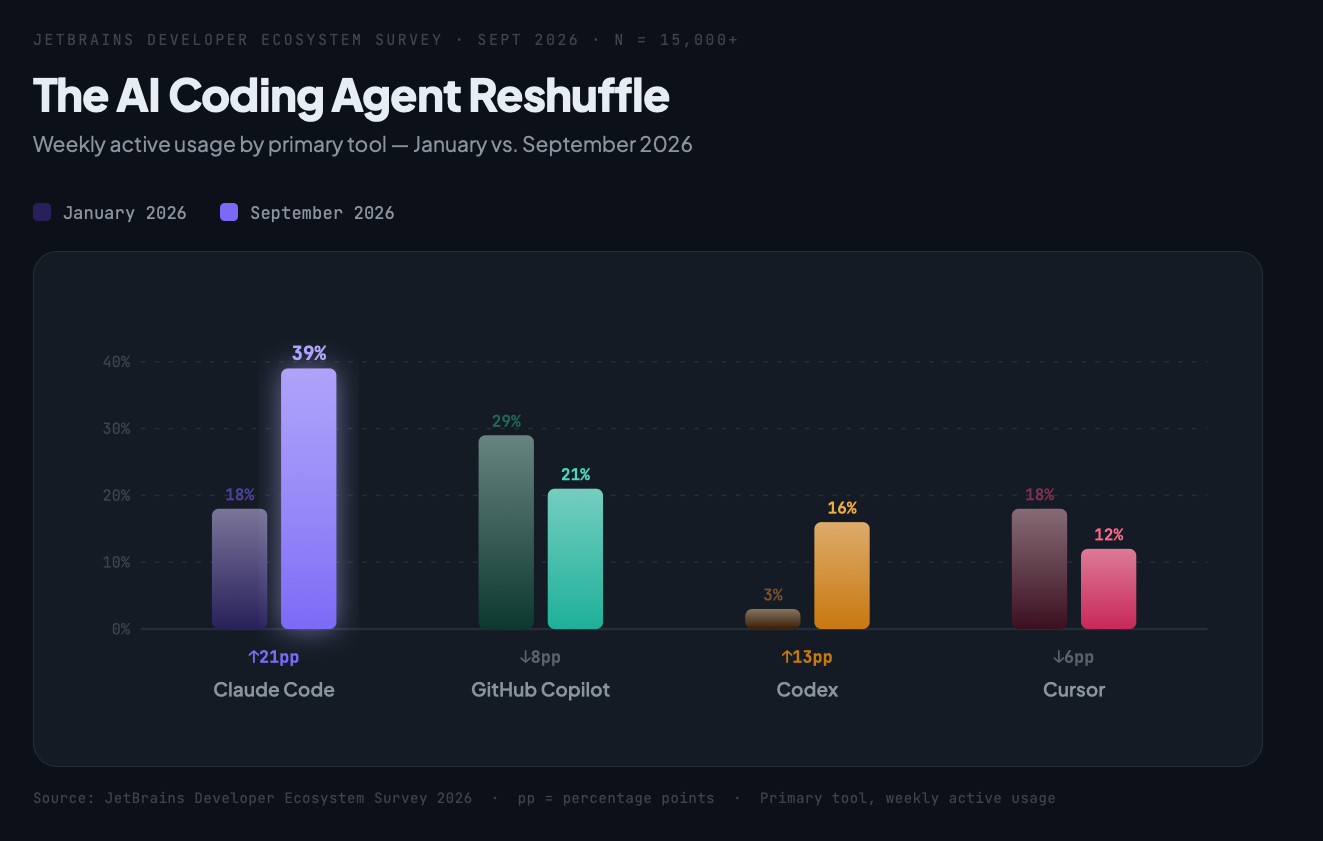
Illustration 1: Bar/column chart showing AI coding tool adoption shifts — Claude Code surge from 18% → 39%, GitHub Copilot decline from 29% → 21%, Codex jump from 3% → 16%, and the field of emerging tools (OpenCode, JetBrains AI, Cursor). Two side-by-side bars: "Jan 2026" vs "Sept 2026".
The Numbers Tell a Story Most People Are Missing
The raw stat is 90%, but the more interesting data is in the tool-by-tool shifts since January 2026. Claude Code has absolutely run away from the field — adoption went from 18% to 39% globally (and 47% among US developers), with a wild 80% conversion rate from "I use it sometimes" to "it's my primary tool." That's not just growth, that's lock-in behavior.
Meanwhile, GitHub Copilot — the tool that basically created this category — has slid from 29% adoption to 21%. It's still widely known (79% awareness), but developers are choosing other things when they actually sit down to work. Cursor took a similar hit, dropping from 18% to 12%. OpenAI's Codex is the other big mover, jumping from 3% to 16% — clearly benefiting from the API-native crowd.
What does this mean for you as a MERN developer? Mostly that the "just use Copilot because everyone uses Copilot" logic is outdated. The market is fragmenting — different tools for different contexts — and the developers who are getting the most out of this are combining tools rather than picking one and calling it done.
The Two-Tool Stack That Actually Makes Sense
The practical guidance coming out of the 2026 research is pretty clear: pair one IDE-integrated agent with one CLI agent.
For MERN work, that might look like:
IDE: Cursor or GitHub Copilot inside VS Code for in-editor completions, refactoring, and inline chat when you're heads-down in component files
CLI: Claude Code or Codex CLI for longer-horizon tasks — generating a full API route, scaffolding a new Express middleware layer, writing Mongoose schemas from a spec, or running a broader refactor across multiple files
The reason this split works is that IDE agents and CLI agents solve different problems. Your IDE agent is reactive — you're driving, it's assisting. Your CLI agent is more autonomous — you hand it a task with context and it goes and does it. When you stop treating them as competing tools and start treating them as complementary roles, your workflow actually speeds up.
# Example: delegating a full feature task to a CLI agent
claude "Add a /api/users/:id/posts route to the Express app.
Use the existing User model in models/User.js and follow the
same pattern as /api/users/:id. Include input validation and
return 404 if the user doesn't exist."
That one prompt, in a well-structured MERN repo, can produce a working route, appropriate error handling, and basic tests — in under 30 seconds. The key phrase there is "well-structured repo."
Context Engineering Is the Skill No One's Talking About Enough
This is the part most blog posts skip. The reason some developers are getting dramatically better output from AI agents than others isn't the tool — it's the context they feed it.
The 2026 shift is away from "give the agent a giant context window and hope it figures it out" toward what's now being called context engineering: structured project rules, clear task boundaries, and reusable domain knowledge files.
The practical version of this for a MERN project is a file called AGENTS.md (or CLAUDE.md, COPILOT.md depending on your tool) at the repo root. Think of it as onboarding documentation for your AI teammate:
# AGENTS.md

## Project Overview
E-commerce platform. MERN stack. MongoDB Atlas, Express 5, React 19, Node 22.

## File Structure
- /client → React frontend (Vite, TailwindCSS)
- /server → Express API
  - /routes → Route handlers (RESTful, versioned under /api/v1)
  - /models → Mongoose schemas
  - /middleware → Auth (JWT), error handling, rate limiting

## Coding Conventions
- Always use async/await, never .then()
- Error handling via the centralized errorHandler middleware
- Validation with Zod before any DB operation
- Tests in /server/__tests__ using Jest + Supertest

## What NOT to do
- Do not install new packages without asking first
- Do not modify the auth middleware without flagging it
This file doesn't just help the agent — it makes the agent's output reviewable. When it follows the conventions you defined, you can review a PR in two minutes instead of ten.
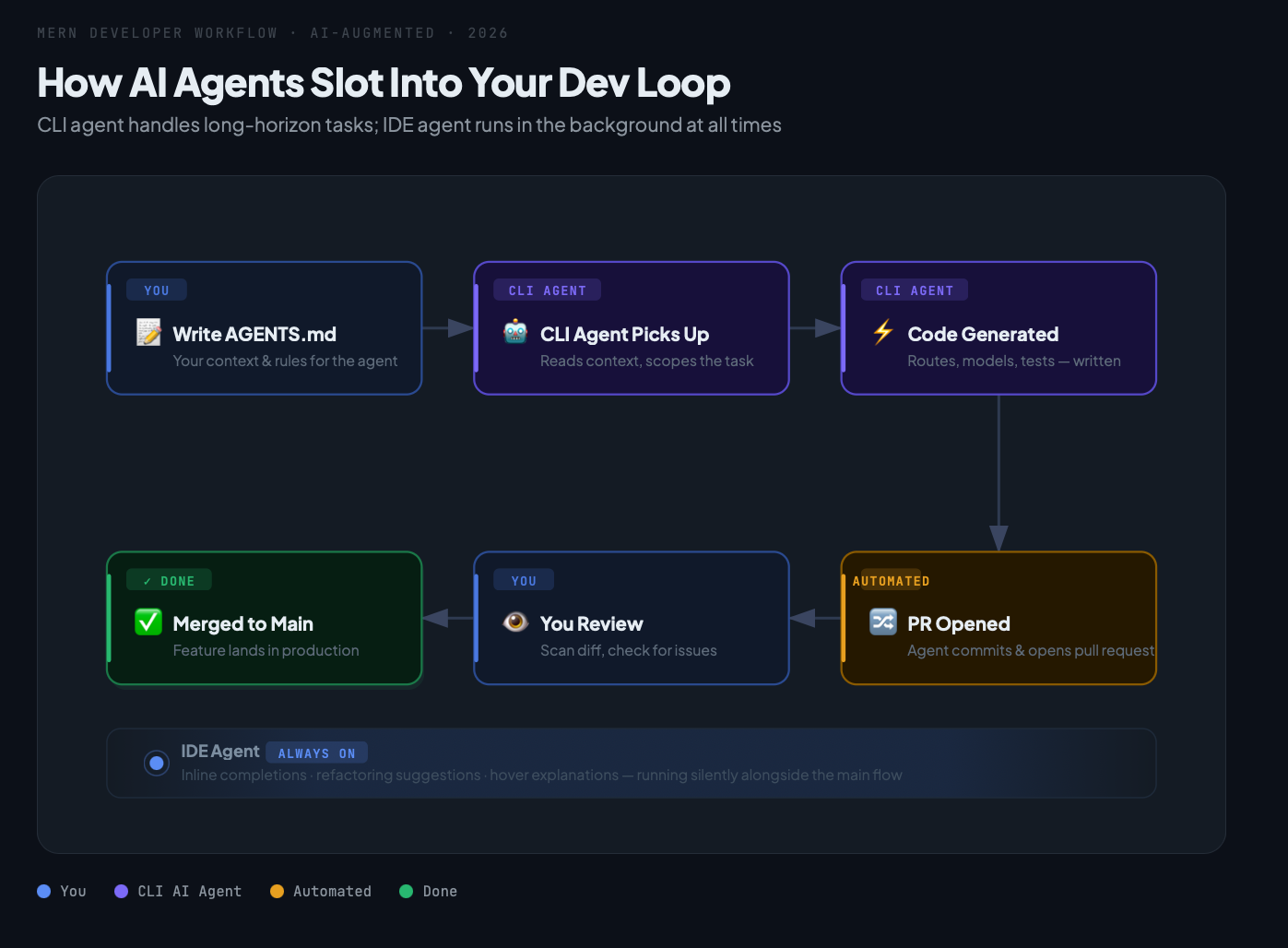
Illustration 2: Workflow diagram showing a MERN developer's AI-augmented workflow loop — Dev writes AGENTS.md context → CLI agent picks up task → generates code → auto-PR opened → dev reviews → merge. Side path shows IDE agent handling smaller inline tasks in parallel.
How This Plays Into Python and Your AI/ML Work
If you're also doing Python work — data pipelines, ML experiments, LangChain integrations — the same principles apply, maybe even more so. Python ML scripts tend to be messier about structure, which means agents either nail it or go completely off-rails.
The move that actually works: treat each ML experiment or data pipeline as its own mini-project with its own AGENTS.md. Something like "this script loads from S3, processes with pandas, trains a scikit-learn model, and saves to MLflow — do not change the MLflow tracking server URI." Small guardrails, big time savings.
One genuinely useful pattern for MERN devs building full-stack AI features: use your CLI coding agent to help write the Python FastAPI endpoints that serve your ML models, then use your IDE agent to wire up the React frontend that calls them. Different tools, same workflow, one cohesive feature.
The Security Angle You Can't Ignore
There's one more shift from the 2026 data that deserves a mention: security is no longer an afterthought in agent workflows. Sandboxing, permission scoping, audit logs, network isolation — these are becoming core requirements, especially in team and enterprise setups.
For blockchain developers in the audience, this maps directly to how you should be thinking about agents touching anything near a smart contract codebase. The blast radius of a bad AI-generated change in a Solidity contract is fundamentally different from a bad React component. The rule from the research: treat your agent's permissions like you'd treat a junior dev's access in production — scoped, audited, and revocable.
At minimum: run your CLI agent with read-only access to your blockchain/contract code unless you've explicitly reviewed what it's about to do. No exceptions.
Where This Is All Going
90% weekly adoption means we're past the inflection point. The productivity gap between developers who've built solid AI-augmented workflows and those who haven't is measurable and growing. But the gap isn't really about which tool you picked — it's about whether you've invested the 30 minutes it takes to write a good AGENTS.md, whether you've learned to split IDE tasks from CLI tasks, and whether you're treating AI output as something to review rather than something to paste.
The developers getting the most out of 2026's tooling aren't the ones who adopted the fastest. They're the ones who were most deliberate.
If you found this useful, drop a comment with which AI coding agent you're currently using and what MERN task it handles best for you — I'm genuinely curious where people have landed. And if you haven't tried a CLI agent alongside your IDE yet, this weekend is a good time to experiment.
About the author
- Love to code, gaming. And I use vim btw.
Comments
Join the discussionNo comments yet. Be the first to comment.