One Zone Lost Power and Half the UK Went Down: Building MERN Apps That Survive It
On Monday morning, around 7am London time, a power event hit one zone of Google Cloud's London region. Not the whole region. One zone out of three. And for the next eight hours, Revolut card payments failed, people couldn't get into their bank apps, and court hearings across England and Wales were at risk of delay.
I spent a good part of this week reading the incident reports, and I keep coming back to one question: if your Express API ran in europe-west2 on Monday, would it have stayed up? Be honest with yourself on that one. Mine probably wouldn't have.
What Actually Happened
Here's what we know so far. Times are in UTC:
- ~06:10 — a power event in zone
europe-west2-b. ThousandEyes saw availability in the region drop off a cliff, with traffic unable to reach services at all. - 38 Google Cloud products were listed as affected on Google's Cloud Service Health dashboard, including Cloud Run, GKE, AlloyDB and Apigee.
- ~11:30 — services start coming back.
- ~14:00 — Google marks the incident resolved. That's roughly 7 hours and 50 minutes in total.
Google also said it was putting existing workloads back first, and warned that customers might not be able to create new ones right away. Keep that in mind. It matters later.
Google hasn't published a full technical explanation of the power event yet, so I'm not going to guess at the root cause. The interesting part for us isn't why the power went out. Power goes out. Hardware dies. Somebody somewhere trips over a cable. The interesting part is how much fell over with it.
"We're on the Cloud" Is Not a Resilience Strategy
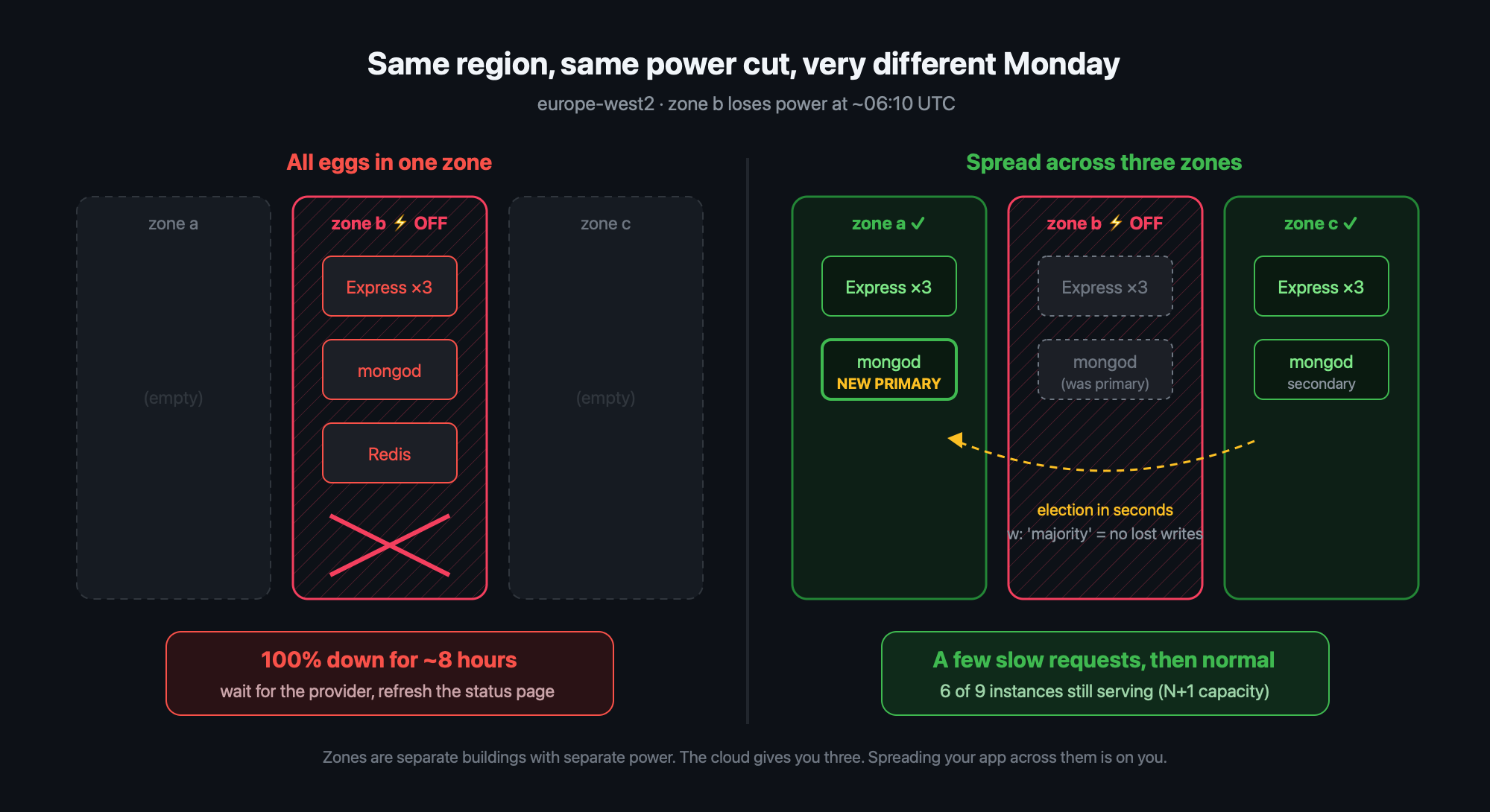
A cloud region is usually split into zones: separate buildings with separate power, cooling and networking. The whole promise is that if one zone dies, the others carry on. But the cloud only gives you the zones. It doesn't spread your app across them for you.
When you run gcloud run deploy, spin up a single VM, or use the default node pool on a zonal GKE cluster, you've often bet everything on a single building without realising it. Same story with a MongoDB box that "we'll make a replica set later."
The big companies learned this the hard way. Netflix's well-known response to AWS outages was to stop trusting any single unit of infrastructure, and to practise losing it on purpose. Their Chaos Monkey kills instances, and its bigger sibling Chaos Kong takes out an entire region so they can prove traffic moves somewhere else. Slack went another way. After running into zonal problems, they moved to a cellular architecture, where each availability zone is a mostly self-contained cell. If a zone starts acting up, they drain traffic away from it, and they don't wait for the cloud provider to fix things first.
Both ideas come down to this: assume any one piece will fail, and decide ahead of time what happens when it does.
Step 1: Your Database Is the First Domino
In most MERN apps the Node processes are stateless and easy to replace. MongoDB isn't. If your only mongod lives in the zone that just lost power, nothing else you did matters.
A replica set with members in three different zones is the minimum. Then configure the driver so it actually takes advantage of that:
// db.js
import mongoose from 'mongoose';

export async function connectDB() {
  await mongoose.connect(process.env.MONGO_URI, {
    // Wait for a majority of members before acknowledging writes,
    // so losing one zone doesn't lose acknowledged data
    w: 'majority',
    retryWrites: true,   // one automatic retry on a failover
    retryReads: true,
    // Fail fast instead of hanging requests for 30s (the default)
    serverSelectionTimeoutMS: 5000,
    // Reads can fall back to a secondary while a new primary is elected
    readPreference: 'primaryPreferred',
  });
}
When the primary's zone goes dark, the remaining two members elect a new primary, usually within seconds. With retryWrites turned on, the driver retries the interrupted write once against the new primary. Your users see a slow request, not an error page. If you're on MongoDB Atlas, pick a region with at least three zones and Atlas spreads the nodes across them for you. Still check it, though. Don't assume.
Step 2: Tell the Load Balancer the Truth
Load balancers move traffic away from bad instances based on health checks. Most Express apps I've seen get this wrong in one of two ways: there's no health check, or there's a /health that returns 200 as long as the process is alive.
Split it in two:
// health.js
import mongoose from 'mongoose';

// Liveness: "is the process alive?" Keep it dumb.
// If this fails, the orchestrator restarts the container.
app.get('/healthz', (req, res) => res.sendStatus(200));

// Readiness: "can I actually serve traffic right now?"
// If this fails, the load balancer stops sending requests here.
app.get('/readyz', async (req, res) => {
  try {
    await mongoose.connection.db.admin().ping();
    res.sendStatus(200);
  } catch {
    res.sendStatus(503);
  }
});
Don't put the database check on the liveness endpoint. If you do, a database blip makes Kubernetes restart every one of your pods at once, and you've just turned a small outage into a big one.
Step 3: Stop Hammering Things That Are Already Down
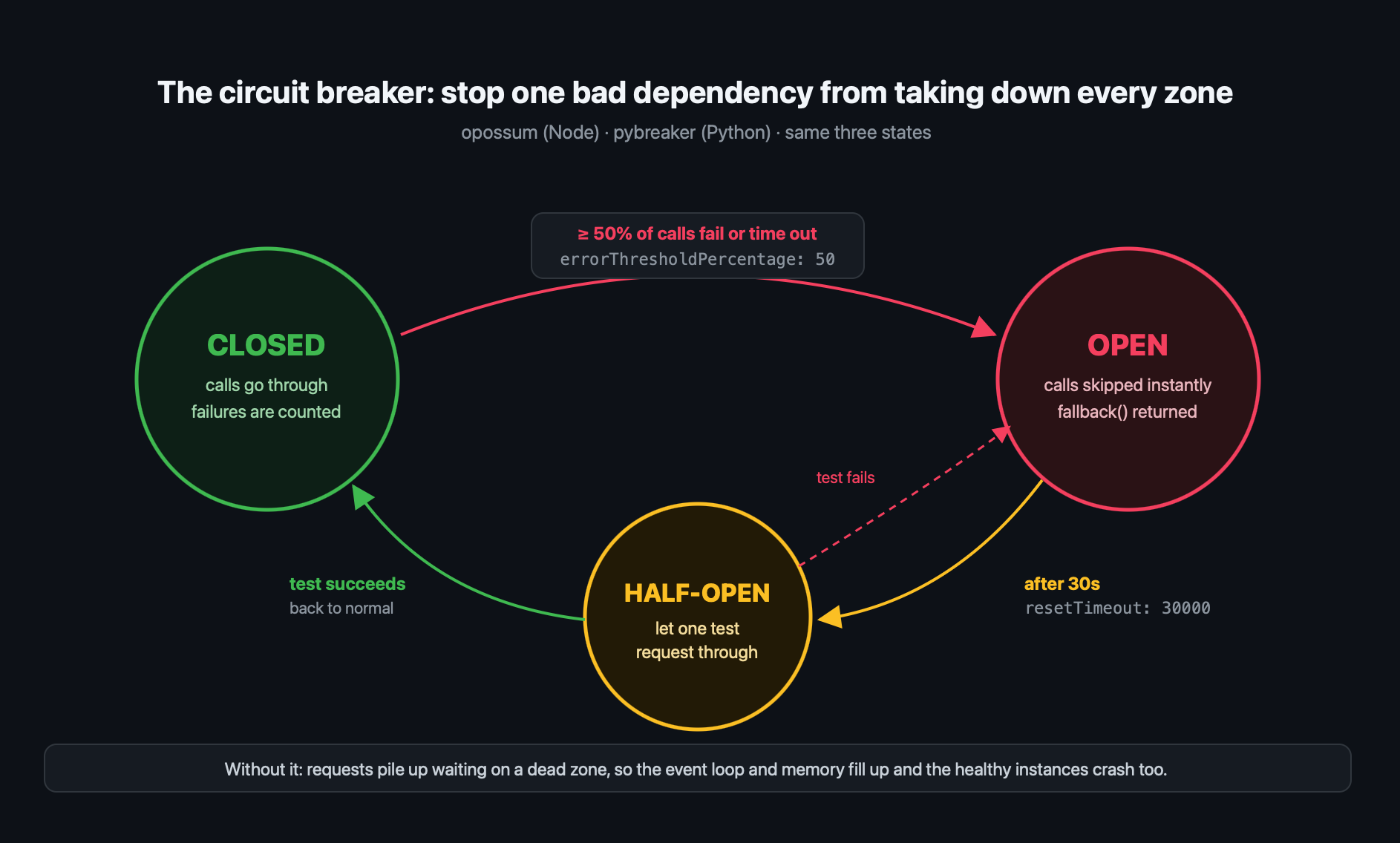
During a zonal failure, the services you depend on don't always fail cleanly. A lot of the time they just get slow. If every request waits 30 seconds for a dead dependency, your Node event loop fills up, memory climbs, and the instances that were healthy fall over too. That's how a problem in one zone spreads to all of them.
A circuit breaker cuts that off. Here it is using opossum:
import CircuitBreaker from 'opossum';

async function fetchRecommendations(userId) {
  const res = await fetch(`${RECO_URL}/users/${userId}`, {
    signal: AbortSignal.timeout(2000), // never wait forever
  });
  if (!res.ok) throw new Error(`reco ${res.status}`);
  return res.json();
}

const breaker = new CircuitBreaker(fetchRecommendations, {
  timeout: 3000,                 // count slow calls as failures
  errorThresholdPercentage: 50,  // trip when half the calls fail
  resetTimeout: 30000,           // try again after 30s
});

// Degrade gracefully: show popular items instead of an error
breaker.fallback(() => ({ items: [], source: 'fallback' }));

app.get('/api/feed', async (req, res) => {
  const recos = await breaker.fire(req.user.id);
  res.json({ recos });
});
The fallback is the bit people skip, and it's the most important part. Netflix's homepage doesn't break when its personalisation service is down. It just shows you a less personal row. Work out what your app's "less personal row" would be.
Python folks, you've got the same pattern in pybreaker and tenacity, and it matters even more in AI pipelines. An LLM provider having a bad region day is exactly the kind of slow, partial failure that piles up timeouts across a FastAPI service.
Step 4: Have Spare Capacity Running Before You Need It
Remember the line about existing workloads coming back first? During a big incident, everyone tries to scale up in the healthy zones at the same moment. New capacity might not be there for you.
So the capacity you'll need during an outage has to be already running before it starts. If you need 6 instances to handle peak traffic, run 3 in each of 3 zones (9 in total). That way you can lose any one zone and still have 6. Yes, it costs more. Ask Revolut's on-call team how much eight hours of failed card payments cost.
Your Monday-Morning Checklist
- MongoDB replica set members are in three different zones (check it, don't assume)
- Driver has
w: 'majority',retryWrites, and a shortserverSelectionTimeoutMS - Separate
/healthzand/readyzendpoints, with the database check only on readiness - Every outbound call has a timeout, and the important ones have a circuit breaker with a fallback
- App instances are spread across zones, with N+1 capacity
- You've actually tested killing a zone, at least once, in staging
That last one is the step everyone skips. You don't have to build Chaos Kong. Just scale one zone's node pool to zero on a Tuesday afternoon and see what breaks. It's a lot cheaper than finding out on a Monday at 7am.
How did your stack get through Monday? If you were hit, I'd love to hear what failed first. Tell me in the comments.
About the author
- Love to code, gaming. And I use vim btw.
Comments
Join the discussionThe zonal-defaults point is the sneaky one for a zonal GKE cluster or a single VM. Cloud Run cuts the other way though: per Google's resource model docs, regional services replicate across zones automatically, so a default deploy is already multi-zone.