MongoDB Just Gave You Free Local Vector Search — Here's What Your MERN App Can Do With It
If you've been putting off building AI features into your MERN app because the setup felt too heavy — a separate vector database here, a cloud service there, a sync pipeline somewhere in between — MongoDB just made that excuse a lot harder to hold onto.
MongoDB quietly shipped vector search and full-text search to its Community Edition and Enterprise Server. These were Atlas-only features before. Now you can run them locally, during development, without a cloud account, without a separate embedding service, and without maintaining two databases that have to stay in sync. It's in public preview, but it works, and it changes the way you prototype AI-powered features.
What Actually Changed (And Why It Took This Long)
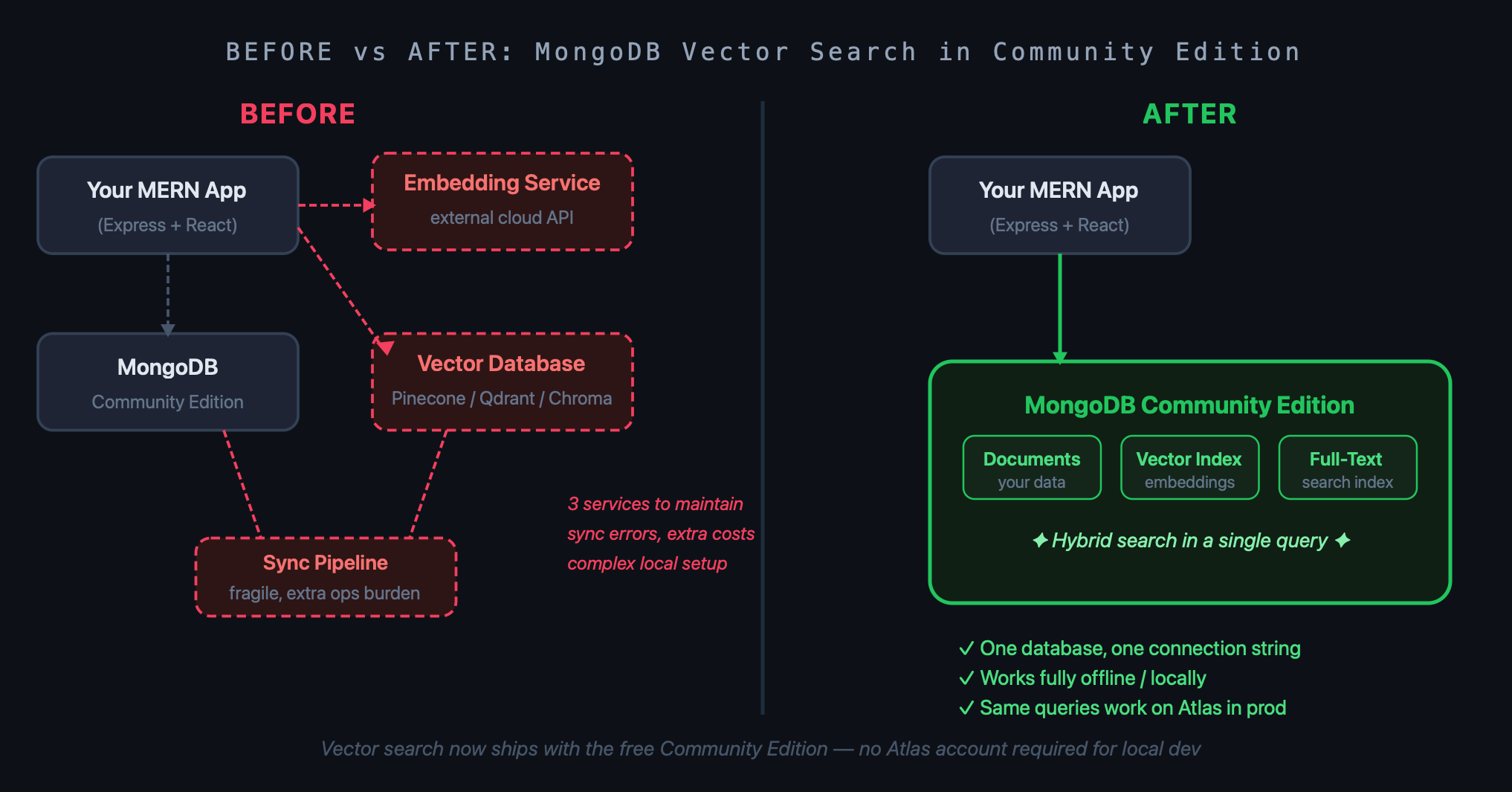
For years, if you wanted semantic search in MongoDB, you needed Atlas Search — the managed cloud product. Building a RAG app locally meant either pointing your dev environment at Atlas anyway (and eating cloud costs during iteration) or spinning up something like Qdrant or Chroma in Docker alongside Mongo, then writing a fragile sync layer to keep them aligned.
MongoDB has now folded vector indexing and full-text search directly into the database engine itself. Community Edition is the free, self-hosted version that most MERN developers already use for local development. Enterprise Server is the on-premises commercial option. Both now support:
Vector indexes — store and search high-dimensional embeddings alongside your documents
Full-text search indexes — the same Lucene-backed search that Atlas Search uses
Hybrid queries — combine semantic similarity and keyword relevance in a single query
The path-to-production story is also clean: you build locally against Community Edition, and when you need Atlas for scaling or managed backups, your queries work as-is. No migration gymnastics.
Why This Is a Big Deal for MERN Developers Specifically
The M in MERN has always been MongoDB. You're probably already running it locally with mongod or Docker. That means you can add vector search to an existing Express API without introducing any new infrastructure dependency.
Think about what that unlocks in practice:
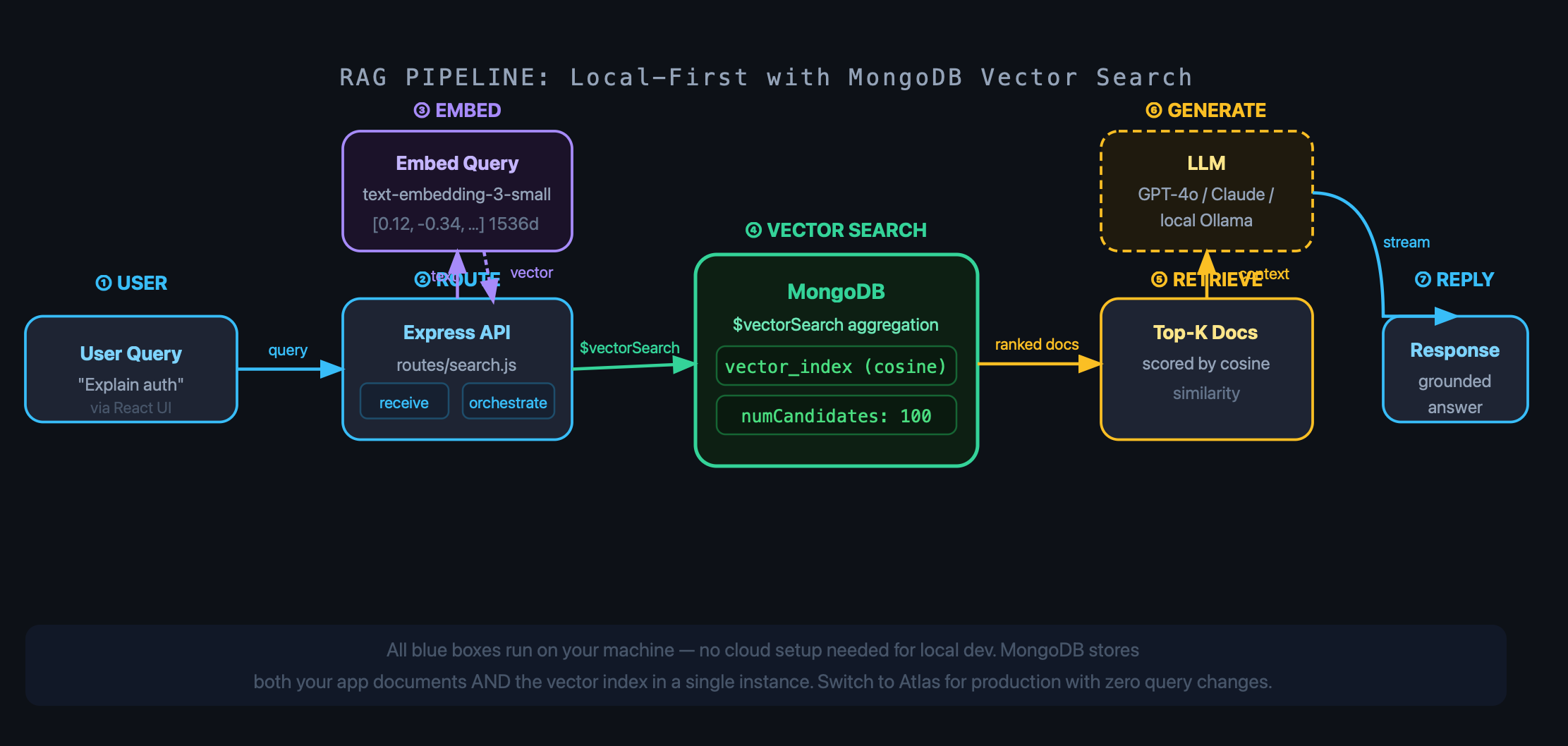
RAG pipelines that don't need a third-party service. A typical retrieval-augmented generation setup needs somewhere to store and search embeddings. Before this, that meant Pinecone, Weaviate, Qdrant, or Atlas Vector Search. Now it's just your local Mongo instance.
Long-term memory for AI agents. If you're building an Express backend that acts as the orchestration layer for an AI agent, you can store the agent's session history, tool call logs, or learned preferences as vectors in the same database you're already using for users and content.
Faster iteration. There's a real productivity difference between running everything locally and constantly pushing to a cloud environment to test a feature. AI apps are already slow to prototype; removing a dependency cuts that drag.
Setting It Up in Your Express API
Assuming you're running MongoDB 8.x locally (you'll need that for vector search support), here's a minimal example of creating a vector index and running a semantic query from Node.js using the official driver.
First, create a vector index on your collection. You can do this programmatically or through mongosh:
// createVectorIndex.js
import { MongoClient } from "mongodb";

const client = new MongoClient("mongodb://localhost:27017");
const db = client.db("myapp");
const collection = db.collection("articles");

await collection.createSearchIndex({
  name: "vector_index",
  type: "vectorSearch",
  definition: {
    fields: [
      {
        type: "vector",
        path: "embedding",
        numDimensions: 1536, // OpenAI text-embedding-3-small output size
        similarity: "cosine",
      },
    ],
  },
});

await client.close();
Once the index is built, your Express route for semantic search looks like this:
// routes/search.js
import { Router } from "express";
import { MongoClient } from "mongodb";
import OpenAI from "openai";

const router = Router();
const client = new MongoClient(process.env.MONGO_URI);
const openai = new OpenAI({ apiKey: process.env.OPENAI_API_KEY });

router.get("/", async (req, res) => {
  const { q } = req.query;
  if (!q) return res.status(400).json({ error: "Missing query" });

  // Embed the user's query
  const embedRes = await openai.embeddings.create({
    model: "text-embedding-3-small",
    input: q,
  });
  const queryVector = embedRes.data[0].embedding;

  const db = client.db("myapp");
  const results = await db
    .collection("articles")
    .aggregate([
      {
        $vectorSearch: {
          index: "vector_index",
          path: "embedding",
          queryVector,
          numCandidates: 100,
          limit: 5,
        },
      },
      {
        $project: {
          title: 1,
          excerpt: 1,
          score: { $meta: "vectorSearchScore" },
        },
      },
    ])
    .toArray();

  res.json(results);
});

export default router;
That's it. No vector database client, no extra Docker container, no separate API key for a search service. Your Express app calls Mongo the same way it always has, just with $vectorSearch in the aggregation pipeline.
Hybrid Search: The Part Most People Skip
Vector search gives you semantic relevance — great for "find articles similar in meaning to this query." But it can struggle with exact matches. If someone searches for a specific product code or a proper noun, pure vector similarity might not surface the right result.
Hybrid search fixes that by combining a vector search score with a full-text search score. MongoDB lets you do this in a single aggregation pipeline using $search and $vectorSearch with a $unionWith stage, then merging and re-ranking the results.
It's more complex than a single query, but for production search features it's usually worth it. LangChain and LlamaIndex both support MongoDB's hybrid retriever, so if you're building with those you get this behavior out of the box.
Practical Takeaways
A few things worth keeping in mind before you dive in:
It's public preview. The API surface will stabilize, but treat it as preview software. Pin your driver version and read the release notes before upgrading.
You still need to generate embeddings. MongoDB stores and searches vectors; it doesn't create them. You'll need an embedding model — OpenAI's API is the easiest entry point, but Ollama lets you run models like nomic-embed-text locally if you want to keep everything offline.
Index build time matters at scale. Building a vector index on a large collection is not instant. Do this offline or during a maintenance window in production.
Community Edition is fine for dev; Atlas is still the right call for production at scale. The beauty here is that the two are query-compatible now. Build locally, ship to Atlas — same code.
The Real Shift Here
Vector databases became a whole industry almost overnight because AI apps needed somewhere to store embeddings. MongoDB shipping vector search natively in the free edition doesn't kill that industry — dedicated vector databases still have advantages at massive scale — but it does mean that for most MERN developers building real-world AI features, you don't need to evaluate another tool. You already have a database. Now it does vectors too.
If you've been meaning to add semantic search to your Express API, or you want to build a proper RAG pipeline without the cloud setup overhead, now is a genuinely good time to start. Spin up a local Mongo 8.x instance, drop in a vector index, and see how far you get before you need anything else. You might be surprised.