GitHub Copilot Is Going Local — But What's Actually Staying on Your Machine?

Microsoft just announced that GitHub Copilot will start routing some coding tasks to a local model on your machine by the end of October 2026. On paper, it sounds like the privacy win developers have been asking for since Copilot launched. In practice, the story is a lot murkier — and if you're working on a codebase with any kind of data sensitivity, you need to understand exactly what's happening before you flip the switch.
Here's what we actually know, what Microsoft won't say, and how to think about it as a MERN developer.
How the Local Routing Actually Works
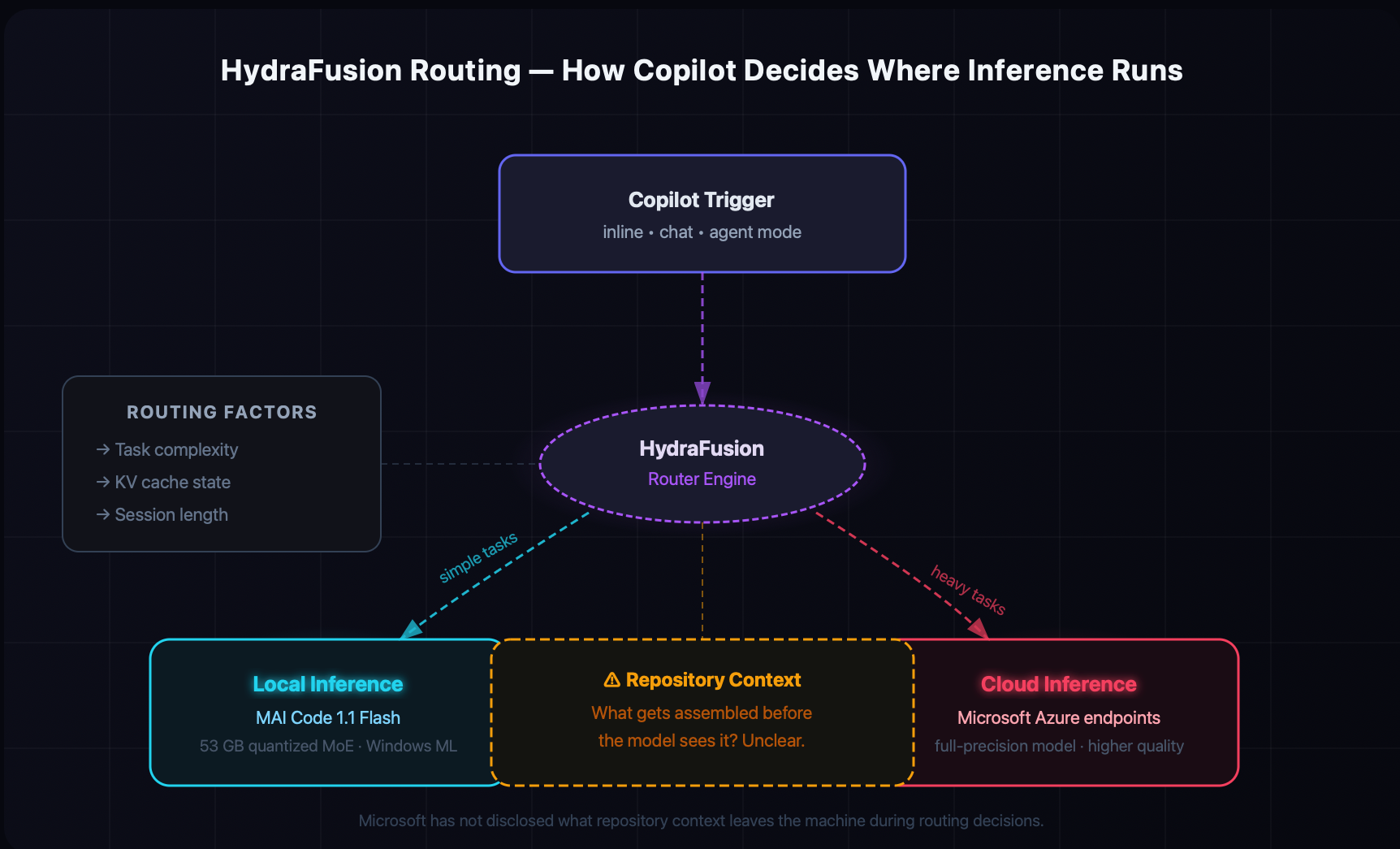
The engine behind this is called Project HydraFusion — GitHub's existing system that picks which AI model handles each Copilot request. Until now, "pick a model" meant picking between cloud-hosted models. The new update extends that to also decide where inference runs: on your device or on Microsoft's servers.
When you trigger Copilot (inline suggestion, chat, agent mode — doesn't matter), HydraFusion weighs a few factors:
Task context — simple autocomplete vs. multi-file refactor vs. shell command execution
Cache state — whether relevant context is already loaded locally
Session type — single turn vs. multi-turn conversation
For most everyday completions, it'll route to the local model. For heavier tasks, it may still hit the cloud. The model running locally is MAI Code 1.1 Flash, a mixture-of-experts model Microsoft quantized from its full cloud version — roughly a 53GB binary after quantization. That's about 80% smaller than the cloud original.
You can configure the routing behavior yourself:
# In GitHub Copilot CLI, set local inference preference
gh copilot config set inference.prefer local

# Or set a local OpenAI-compatible endpoint
gh copilot config set inference.local-endpoint http://localhost:11434/v1
You can also configure it in VS Code's settings if you prefer the GUI:
// .vscode/settings.json
{
  "github.copilot.advanced": {
    "inferenceMode": "local",
    "localModelProvider": "windows-ml"
  }
}
The Privacy Elephant in the Room
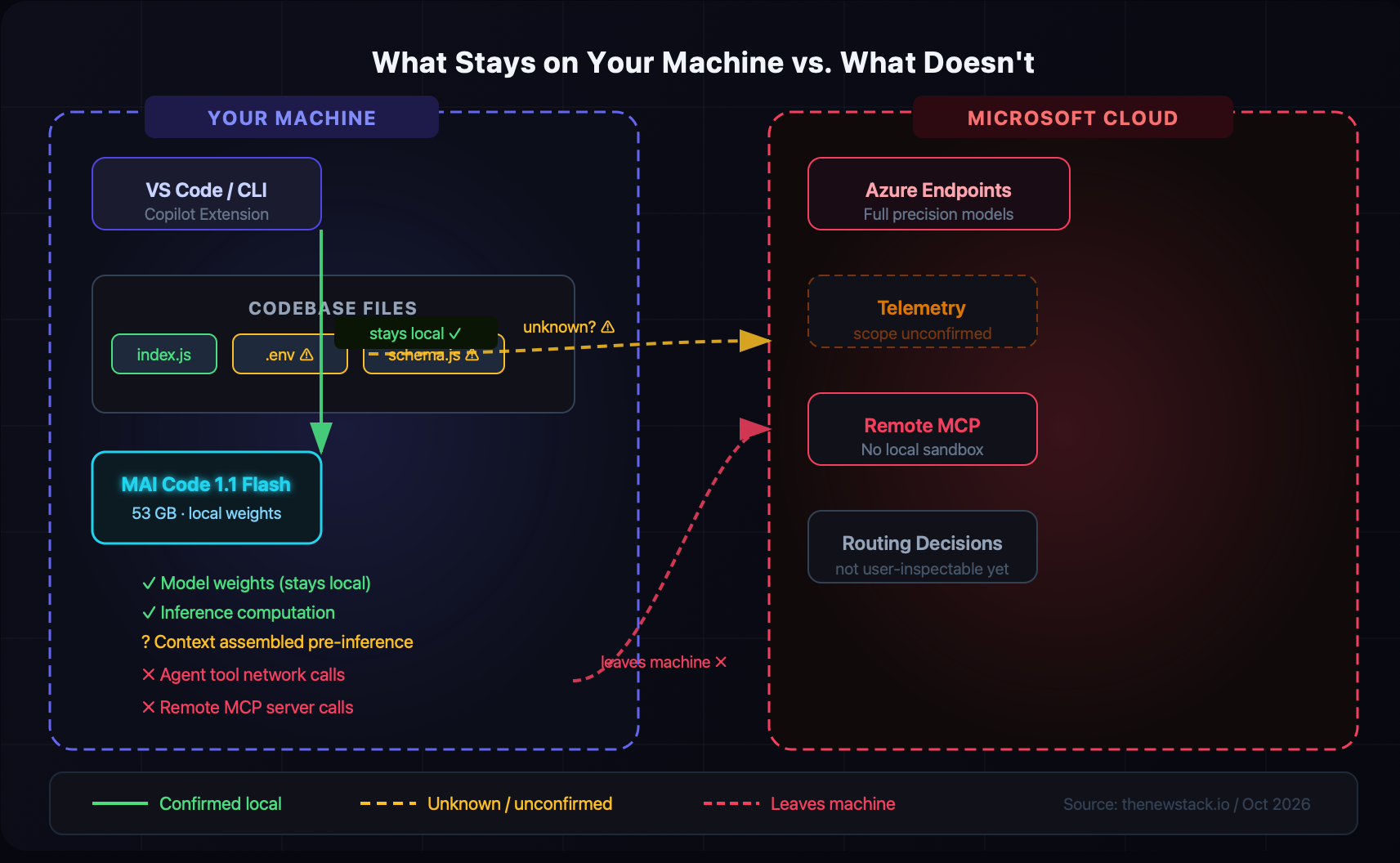
Here's the part that should give you pause: Microsoft still hasn't said what repository context leaves your machine.
When Copilot runs a suggestion, it doesn't just look at the current file. It pulls in open tabs, recent edits, file structure, sometimes git history. The inference of the model might be local, but what about the context that gets assembled before the model sees it? That context pipeline still exists — and Microsoft has been remarkably quiet about whether any of it goes to their telemetry or cloud infrastructure.
The company's own documentation says this: "local inference does not make the session offline." Which is accurate — the agent's tools can still make network requests. If you're using Copilot in agent mode with file tools or MCP servers, those tool calls can go over the network even when the model is running locally. The local sandbox applies OS-level restrictions to shell commands, but file tools rely on checks inside Copilot's own harness — not at the OS level.
What this means for your MERN project:
Environment files —
.env,.env.local, database connection strings. If Copilot opens those files in context, where does that data go?Schema files — your MongoDB schema definitions, API contract files
Internal business logic — the stuff you really wouldn't want on a third-party server
Microsoft demoed an "offline" mode at a recent event, but the demo used GitHub issue and pull request metadata — and the article reporting on it noted that nobody could confirm whether that data was fetched from the network or pre-cached. That's not a reassuring answer when your CTO asks you if code stays internal.
The Hardware Reality Check
Let's be honest: most developers can't run this today. The initial rollout targets NVIDIA RTX Spark Windows PCs, and at a 256K-token context window, Microsoft measured peak memory usage at 75.5GB. Your 32GB gaming laptop isn't cutting it. A 16GB MacBook Pro isn't in the conversation.
For a 53GB model, even just loading the weights requires:
Model weights:       ~53 GB (quantized)
KV cache (256K ctx): ~22 GB (grows with context)
OS + app overhead:   ~3-4 GB
─────────────────────────────
Total (peak):        ~78 GB
The benchmark numbers are fine — 70.8% on SWE-Bench Verified versus 72.6% for the full-precision cloud version. You're trading about 2 percentage points of quality for local inference. That's a reasonable tradeoff if privacy is the goal. But the hardware bar is real, and right now this feature is more of a preview for people on high-end developer workstations than something the average MERN dev can spin up today.
Running a Big Model on Hardware You Actually Own
Here's the thing — you don't need an RTX Spark to run a capable local coding model today. The trick is fragmented inference: splitting the model across your available GPU VRAM, system RAM, and in a pinch, even your SSD.
Quantization first. Tools like llama.cpp and Ollama use the GGUF format to compress model weights. A 70B parameter model drops from ~140GB at full precision to roughly 40GB at 4-bit — with barely noticeable quality loss for code tasks:
# Pull a quantized coding model via Ollama
ollama pull qwen2.5-coder:32b   # ~20GB at Q4 — runs on 24GB GPU or 32GB RAM
ollama serve
GPU + CPU layer splitting. If you have 8–12GB of VRAM and plenty of RAM, llama.cpp lets you push some layers to the GPU and run the rest on CPU:
# -ngl 20 = 20 transformer layers on GPU, rest on CPU
./llama-cli -m qwen2.5-coder-32b.Q4_K_M.gguf -ngl 20 -c 4096
Hugging Face Accelerate handles this automatically for Python workflows with device_map="auto":
from transformers import AutoModelForCausalLM

model = AutoModelForCausalLM.from_pretrained(
    "Qwen/Qwen2.5-Coder-32B",
    device_map="auto",   # auto-distributes across GPU → CPU → disk
    load_in_4bit=True    # quantize on load with bitsandbytes
)
Multi-GPU with vLLM splits the model across cards using tensor parallelism — useful if your team has a shared inference box:
python -m vllm.entrypoints.openai.api_server \
  --model Qwen/Qwen2.5-Coder-32B \
  --tensor-parallel-size 2
Disk offloading also exists but is too slow for real use. The sweet spot for most MERN devs: Ollama + Q4 GGUF on a 32GB RAM machine — you get ~5–10 tokens/sec on CPU-only, fast enough for completions and chat.
What You Should Actually Do Right Now
If you're on a solo project or a small team and you're not handling sensitive data, this is mostly noise for you. Copilot will route intelligently, suggestions will keep working, and you don't need to change anything.
If you're working with client data, internal business logic, or anything covered by a data processing agreement, here's what I'd do:
1. Audit your Copilot context scope. Check what files Copilot is actually indexing. VS Code exposes this in the Copilot extension panel. Remove access to .env files and sensitive configs.
// .copilotignore (add to .gitignore or project root)
.env
.env.*
secrets/
internal/
2. Lock down tool access if you're using agent mode. Until Microsoft clarifies the routing transparency story, treat any tool call in agent mode as potentially reaching the network.
3. Watch for the transparency controls. The open question — whether developers can inspect routing decisions — is something GitHub has acknowledged but hasn't shipped yet. Keep an eye on the GitHub Copilot changelog. When routing transparency lands, audit it immediately.
4. Consider self-hosted alternatives in the meantime. If your team's data policy requires fully auditable inference, tools like ollama with Code Llama or Qwen2.5-Coder are deployable today with complete control over what goes where:
# Run Qwen2.5-Coder locally via Ollama
ollama pull qwen2.5-coder:32b
ollama serve

# Point Copilot's local endpoint at it
gh copilot config set inference.local-endpoint http://localhost:11434/v1
The Bigger Picture
GitHub Copilot going local is genuinely a step in the right direction. AI coding tools accumulate more context over time — not less — and the privacy concerns around that context are legitimate, especially for teams building financial software, healthcare apps, or anything handling PII.
But a feature doesn't earn privacy trust just by running on your hardware. Trust comes from transparency: clear documentation about what leaves the machine, under what conditions, and how to verify it. Microsoft isn't there yet, and until they are, "local inference" is more of a marketing promise than a security guarantee.
Keep building, keep questioning what your tools actually do under the hood. That skepticism is exactly what senior devs are paid for.
What's your take on Copilot's local mode? Are you planning to use it, or sticking with a self-hosted setup? Drop it in the comments.