Stop Paying the AI Tax: Self-Hosted Inference for MERN Devs with vLLM
Every MERN developer who's shipped an AI feature knows the moment. You open your OpenAI billing dashboard, do a quick mental calculation of tokens per request × daily active users, and quietly close the tab before anyone sees the number. There's a better way — and in 2026, it's more accessible than ever.
Self-hosted inference has matured to the point where a single machine with a decent GPU can serve production LLM traffic with the same OpenAI-compatible API you're already using. No refactoring your Express routes. No swapping SDKs. Just your model, your hardware, and zero per-token tax.
Why Self-Hosting Actually Makes Sense Now
A year ago, self-hosting an LLM meant fighting with CUDA versions, patching together inference scripts, and praying your batching logic didn't OOM the machine at 3 AM. That era is mostly over.
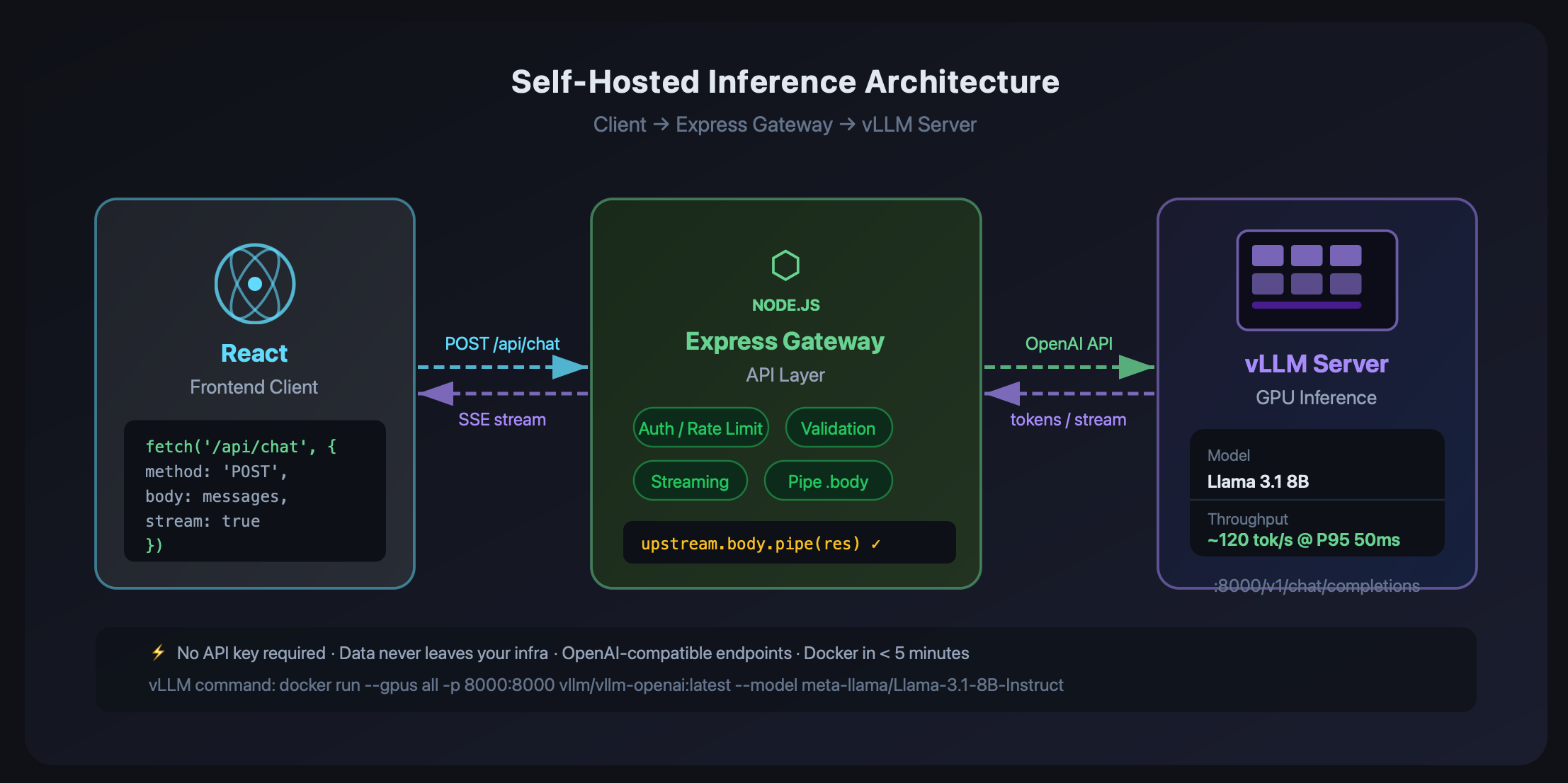
Tools like vLLM, Ollama, and LocalAI have commoditized the hard parts. vLLM in particular has become the go-to for teams that need serious throughput — it implements continuous batching and PagedAttention, which together can push ~120 tokens/second on an RTX 4090 with P95 latencies around 50ms under 100 concurrent requests. That's not a toy number. That's production.
The argument for self-hosting breaks down into three things:
Cost. At scale, hosting a Llama-3-8B on a $0.80/hr spot GPU instance typically undercuts GPT-4o by 60–80%. The crossover point where self-hosting wins varies, but most teams hit it somewhere around a few million tokens a day.
Privacy. If your users are submitting personal data, medical info, or proprietary business content to your AI features, sending that to a third-party API has compliance implications. Self-hosted means the data never leaves your infrastructure.
Latency control. You own the stack. You can co-locate your inference server with your Express backend, eliminate cross-region hops, and tune the model config directly.
The Landscape: Picking Your Stack
Not all inference servers are built for the same use case. Here's the honest breakdown:
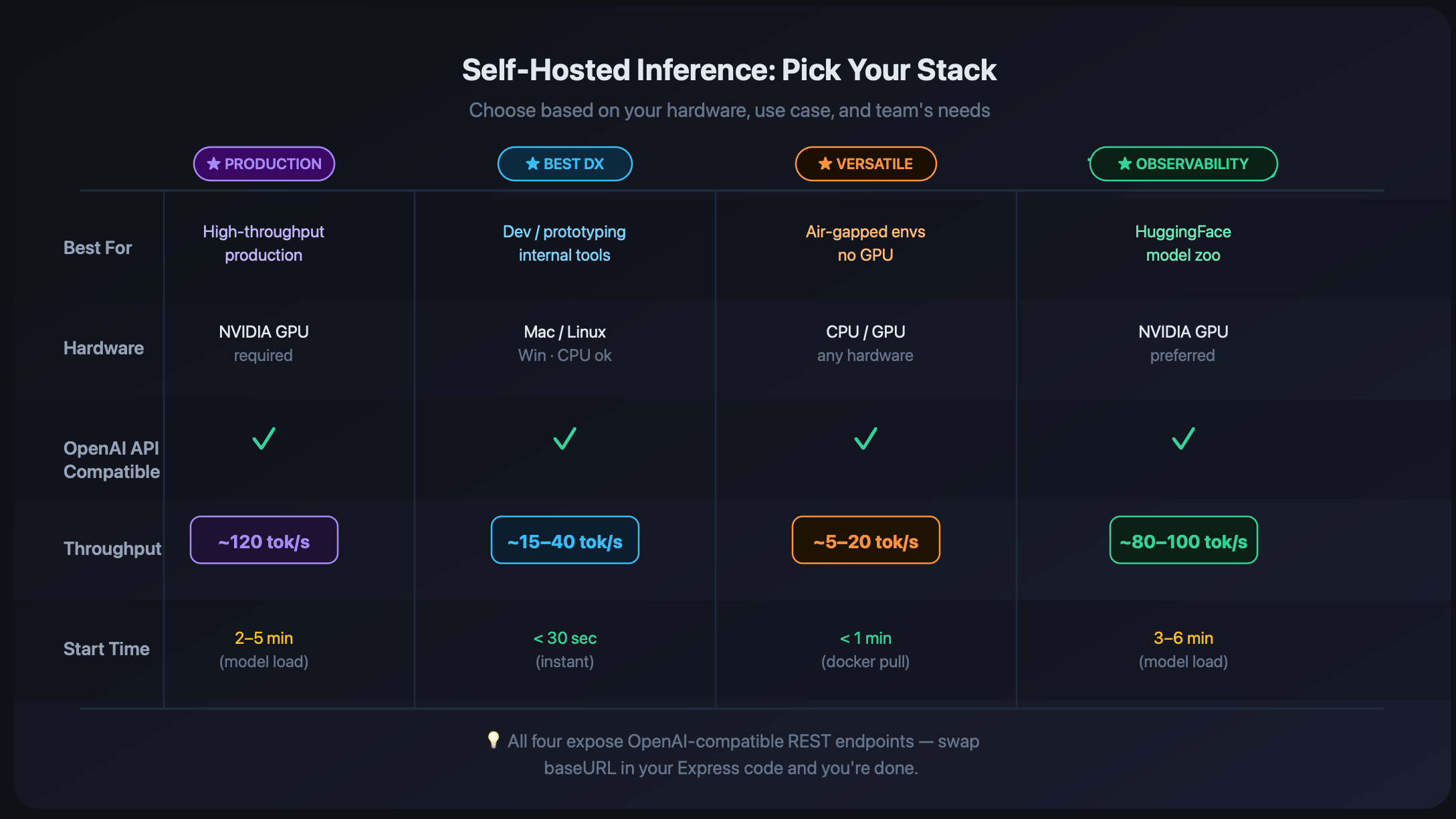
vLLM — Best for throughput-first production workloads. OpenAI-compatible REST API out of the box, aggressive PagedAttention memory management, good quantization support (GPTQ, AWQ, FP8). Requires an NVIDIA GPU. This is the one you want if you're serving real traffic.
Ollama — Best for developer experience and local dev. Pull a model with one command, get an API instantly. Not optimized for high-concurrency production traffic, but excellent for prototyping and internal tools. Works on Mac (Apple Silicon), Linux, Windows.
LocalAI — The Swiss Army knife. CPU-compatible, supports a huge range of model formats, runs on any machine. Slower than vLLM but remarkable for air-gapped environments or teams without GPU access.
Text Generation Inference (TGI) — Hugging Face's offering. Built-in Prometheus metrics and OpenTelemetry tracing, great if you're already deep in the HF ecosystem.
For this walkthrough, we'll use vLLM since most MERN devs are deploying to cloud VMs and need something production-ready.
Setting Up vLLM (It's Honestly Just Docker)
Spin up a VM with an NVIDIA GPU (a single A10G or RTX 4090 works fine for 7–8B models), install the NVIDIA container toolkit, and:
docker run --gpus all \
  -p 8000:8000 \
  --ipc=host \
  vllm/vllm-openai:latest \
  --model meta-llama/Llama-3.1-8B-Instruct \
  --max-model-len 2048 \
  --gpu-memory-utilization 0.9 \
  --disable-log-stats
That's it. You now have an OpenAI-compatible API running at http://localhost:8000. The --max-model-len flag prevents OOM errors with variable-length batches. The --gpu-memory-utilization 0.9 cap gives the OS a little breathing room. Skip --disable-log-stats if you want metrics during development.
Verify it's alive:
curl http://localhost:8000/v1/models
You should see your model listed, the same shape as OpenAI's /v1/models response.
Wiring It Into Your Express Backend
Here's where it gets satisfying. Because vLLM speaks the OpenAI API spec, you don't need to change your existing AI logic. You just swap the base URL.
Option 1: Update the OpenAI SDK base URL
import OpenAI from 'openai';

const client = new OpenAI({
  apiKey: 'not-needed', // vLLM doesn't require a real key
  baseURL: process.env.INFERENCE_URL || 'http://localhost:8000/v1',
});

// Everything else stays the same
const response = await client.chat.completions.create({
  model: 'meta-llama/Llama-3.1-8B-Instruct',
  messages: [{ role: 'user', content: prompt }],
  stream: true,
});
Option 2: Express gateway with streaming
If you want more control — rate limiting, auth, caching, logging — a thin Express gateway is the way to go:
import express from 'express';
import fetch from 'node-fetch';

const app = express();
app.use(express.json());

const INFERENCE_URL = process.env.INFERENCE_URL || 'http://localhost:8000';

app.post('/api/chat', async (req, res) => {
  const { messages, stream = false } = req.body;

  const upstream = await fetch(`${INFERENCE_URL}/v1/chat/completions`, {
    method: 'POST',
    headers: { 'Content-Type': 'application/json' },
    body: JSON.stringify({
      model: 'meta-llama/Llama-3.1-8B-Instruct',
      messages,
      stream,
    }),
  });

  if (!upstream.ok) {
    return res.status(upstream.status).json({ error: 'Inference server error' });
  }

  if (stream) {
    // Pipe directly — don't buffer the whole response
    res.setHeader('Content-Type', 'text/event-stream');
    res.setHeader('Cache-Control', 'no-cache');
    upstream.body.pipe(res);
  } else {
    const data = await upstream.json();
    res.json(data);
  }
});

app.listen(3001, () => console.log('Gateway running on :3001'));
The critical thing here is the streaming path: pipe the response body directly, don't buffer it. Buffering the full completion before sending kills your latency and memory profile. This is the single most common mistake devs make when first building an inference gateway.
Connecting It to Your React Frontend
On the React side, consuming a streaming response from your Express gateway is straightforward with the Fetch API:
async function streamChat(messages, onChunk) {
  const res = await fetch('/api/chat', {
    method: 'POST',
    headers: { 'Content-Type': 'application/json' },
    body: JSON.stringify({ messages, stream: true }),
  });

  const reader = res.body.getReader();
  const decoder = new TextDecoder();

  while (true) {
    const { done, value } = await reader.read();
    if (done) break;

    const chunk = decoder.decode(value);
    // SSE format: "data: {...}\n\n"
    const lines = chunk.split('\n').filter(l => l.startsWith('data: '));

    for (const line of lines) {
      if (line === 'data: [DONE]') break;
      try {
        const parsed = JSON.parse(line.slice(6));
        const token = parsed.choices[0]?.delta?.content;
        if (token) onChunk(token);
      } catch (_) {}
    }
  }
}

// Usage in a component
const [output, setOutput] = useState('');

await streamChat(
  [{ role: 'user', content: userInput }],
  (token) => setOutput(prev => prev + token)
);
This gives you the same real-time streaming UX users expect — tokens appearing as they're generated, not a wall of text after a 10-second wait.
Practical Takeaways
Before you go provision a GPU, a few honest notes:
Start with Ollama locally. Before you touch production infrastructure, run Ollama on your dev machine. curl https://ollama.ai/install.sh | sh && ollama run llama3.1 — you've got a working API in 5 minutes. Validate your integration end-to-end before worrying about GPU specs.
Model size vs. hardware. Rule of thumb: a 7–8B model needs ~16GB VRAM for FP16 weights. A 4-bit quantized version (GGUF, AWQ) halves that. An RTX 4080 (16GB) handles a 7B model in FP16 comfortably. Going up to 70B requires an A100 or a multi-GPU setup — vLLM's tensor parallelism handles this with --tensor-parallel-size 4.
Security your gateway. Your inference endpoint should never be public. Put it behind your VPC, add API key middleware to the Express gateway, and rate-limit per user. vLLM has no auth by default.
Load test before you commit. k6 or autocannon will tell you the truth about your setup before your users do. Find your p99 latency and plan your concurrency limits accordingly.
The Bottom Line
Self-hosted inference isn't a "someday when we have the budget" thing anymore. A $400/month cloud GPU instance serving a quantized Llama 3.1 8B can handle a surprising amount of real production traffic, and you keep the data, the latency, and the economics.
The MERN stack integrates cleanly — vLLM's OpenAI-compatible API means your existing code barely changes. Add a thin Express gateway for the cross-cutting concerns, stream the responses straight through, and your React frontend doesn't need to know or care where the tokens are coming from.
If you're already paying meaningful money for inference API calls, run the numbers. You might be surprised how quickly self-hosting pencils out.
If you found this useful, share it with a dev who's silently sweating their AI API bill. And if you've shipped a self-hosted inference setup in production, I'd love to hear what you learned — drop it in the comments.
About the author
- Love to code, gaming. And I use vim btw.
Comments
Join the discussionNo comments yet. Be the first to comment.