Streaming From Express to React — The Full Picture Most Tutorials Skip
Here's a scenario that's become pretty standard in 2026: your MERN app calls an LLM, and the user has to sit there staring at a loading spinner for 3–5 seconds before any text appears. The API is streaming the response fine — you're just collecting it all on your Express server and flushing it at the end. That's the problem. Let's fix it, from both ends of the wire.
This post covers the full picture: how to stream from an Express backend and how to correctly consume that stream on the React side. No hand-waving, actual code you can drop in.
What "Streaming" Actually Means at the HTTP Level
Before jumping into code, worth being clear on the mechanism. HTTP streaming works through chunked transfer encoding — instead of the server sending one big response body, it sends pieces (chunks) over an open connection and signals completion with a zero-length chunk.
There are two common patterns built on top of this:
Server-Sent Events (SSE) — A specific text format over text/event-stream. The connection stays open, the server pushes named events, and the browser handles reconnection automatically. One-directional: server to client only.
Raw chunked fetch — You open a fetch() request and read the response body as a ReadableStream. More flexible (works with POST, lets you send a request body), but you handle the parsing yourself.
SSE is simpler for most streaming use cases. Raw streaming is better when you need POST semantics (like sending a prompt body to your LLM endpoint).
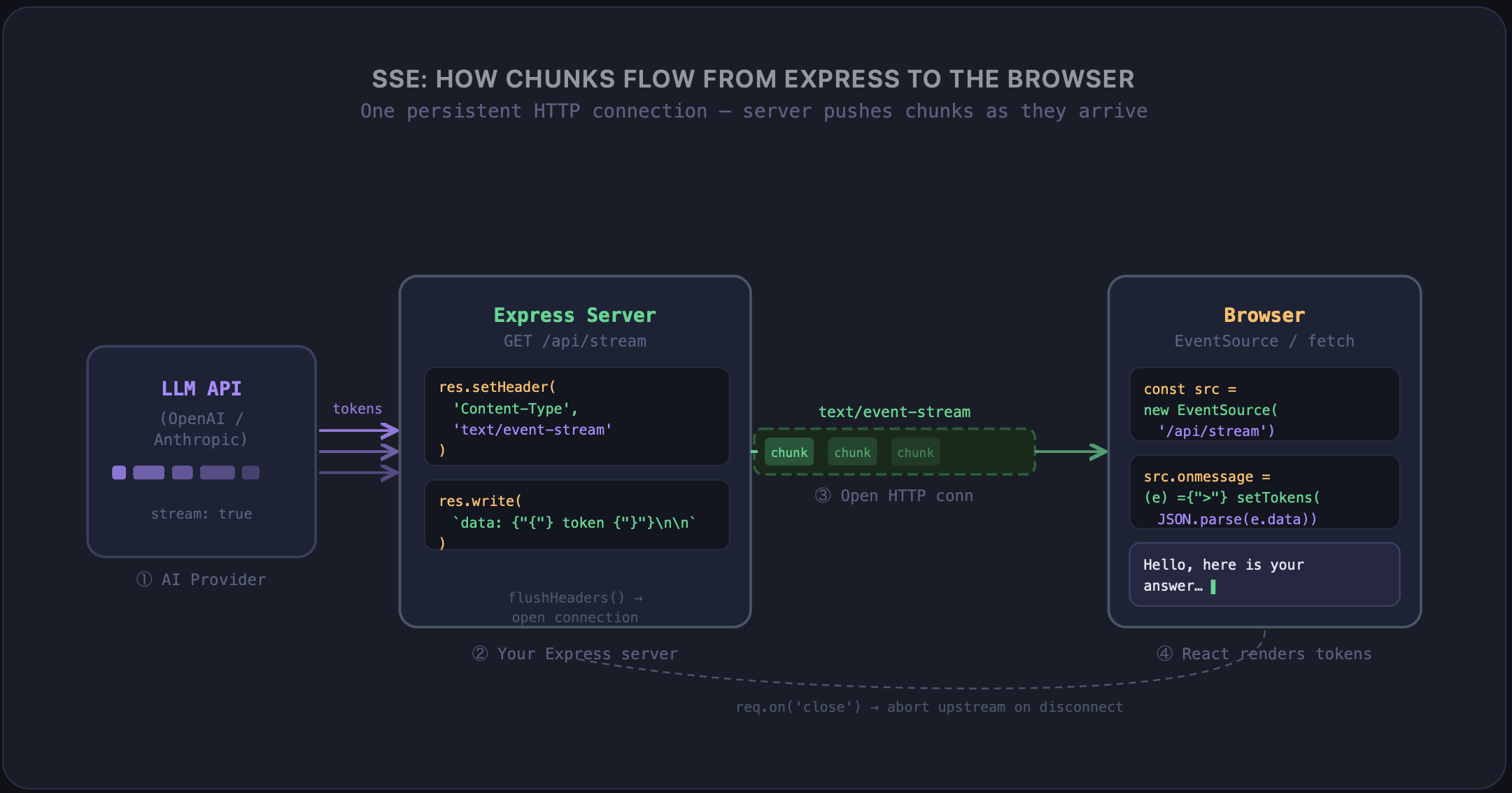
Server Side: Streaming SSE From Express
Here's a clean Express endpoint that proxies an LLM stream as SSE:
// routes/chat.js
import express from 'express';
import OpenAI from 'openai';

const router = express.Router();
const openai = new OpenAI();

router.get('/stream', async (req, res) => {
  const { prompt } = req.query;

  // SSE headers — these three are required
  res.setHeader('Content-Type', 'text/event-stream');
  res.setHeader('Cache-Control', 'no-cache');
  res.setHeader('Connection', 'keep-alive');

  // Flush headers immediately so the browser knows we're streaming
  res.flushHeaders();

  try {
    const stream = await openai.chat.completions.create({
      model: 'gpt-4o',
      messages: [{ role: 'user', content: prompt }],
      stream: true,
    });

    for await (const chunk of stream) {
      const token = chunk.choices[0]?.delta?.content ?? '';
      if (token) {
        // SSE format: "data: <payload>\n\n"
        res.write(`data: ${JSON.stringify({ token })}\n\n`);
      }
    }

    // Signal the end of the stream
    res.write('data: [DONE]\n\n');
    res.end();
  } catch (err) {
    res.write(`data: ${JSON.stringify({ error: err.message })}\n\n`);
    res.end();
  }

  // Clean up if the client disconnects early
  req.on('close', () => {
    stream?.controller?.abort();
  });
});
A few things worth pointing out here. res.flushHeaders() is important — without it, some Node.js environments buffer the headers until the first res.write(), which can add latency. The \n\n double newline in the SSE format is not optional; that's how the browser's EventSource parser knows where one event ends and the next begins. And cleaning up on req.on('close') is important — if the user navigates away, you want to cancel the upstream LLM request, not burn tokens on a response nobody's reading.
Server Side: Streaming a MongoDB Cursor
Same idea applies to large database reads. Instead of loading 50,000 documents into memory, stream the cursor:
router.get('/export', async (req, res) => {
  res.setHeader('Content-Type', 'text/event-stream');
  res.setHeader('Cache-Control', 'no-cache');
  res.setHeader('Connection', 'keep-alive');
  res.flushHeaders();

  const cursor = db.collection('orders').find({ status: 'completed' });

  for await (const doc of cursor) {
    res.write(`data: ${JSON.stringify(doc)}\n\n`);
  }

  res.write('data: [DONE]\n\n');
  res.end();
});
Your memory footprint stays flat regardless of how many documents exist. This is particularly handy for export features where users want to download or process large datasets.
Frontend: Consuming SSE With EventSource
For GET-based SSE endpoints, the browser's built-in EventSource is the cleanest option:
// hooks/useSSEStream.js
import { useEffect, useRef, useState } from 'react';

export function useSSEStream(url) {
  const [tokens, setTokens] = useState([]);
  const [done, setDone] = useState(false);
  const sourceRef = useRef(null);

  useEffect(() => {
    const source = new EventSource(url);
    sourceRef.current = source;

    source.onmessage = (event) => {
      if (event.data === '[DONE]') {
        setDone(true);
        source.close();
        return;
      }

      const { token } = JSON.parse(event.data);
      setTokens((prev) => [...prev, token]);
    };

    source.onerror = () => {
      source.close();
    };

    return () => source.close();
  }, [url]);

  return { text: tokens.join(''), done };
}
Usage:
function ChatResponse({ prompt }) {
  const { text, done } = useSSEStream(`/api/stream?prompt=${encodeURIComponent(prompt)}`);

  return (
    <p>
      {text}
      {!done && <span className="cursor-blink">▌</span>}
    </p>
  );
}
EventSource automatically reconnects if the connection drops, which is nice for flaky networks. The downside: it only works with GET requests. If your endpoint needs a request body (like passing a full conversation history), you'll need the fetch approach below.
Frontend: fetch() + ReadableStream for POST Endpoints
This is the pattern you want when you need to POST a body to your streaming endpoint:
// hooks/useStreamingFetch.js
import { useCallback, useRef, useState } from 'react';

export function useStreamingFetch() {
  const [output, setOutput] = useState('');
  const [streaming, setStreaming] = useState(false);
  const abortRef = useRef(null);

  const startStream = useCallback(async (messages) => {
    // Cancel any in-flight stream
    abortRef.current?.abort();
    abortRef.current = new AbortController();

    setOutput('');
    setStreaming(true);

    try {
      const res = await fetch('/api/chat/stream', {
        method: 'POST',
        headers: { 'Content-Type': 'application/json' },
        body: JSON.stringify({ messages }),
        signal: abortRef.current.signal,
      });

      const reader = res.body.getReader();
      const decoder = new TextDecoder();

      while (true) {
        const { done, value } = await reader.read();
        if (done) break;

        const chunk = decoder.decode(value, { stream: true });

        // Parse SSE lines manually
        for (const line of chunk.split('\n')) {
          if (!line.startsWith('data: ')) continue;
          const data = line.slice(6).trim();
          if (data === '[DONE]') break;

          try {
            const { token } = JSON.parse(data);
            setOutput((prev) => prev + token);
          } catch {
            // Partial chunk — will reassemble on next read
          }
        }
      }
    } catch (err) {
      if (err.name !== 'AbortError') console.error(err);
    } finally {
      setStreaming(false);
    }
  }, []);

  const stop = useCallback(() => {
    abortRef.current?.abort();
    setStreaming(false);
  }, []);

  return { output, streaming, startStream, stop };
}
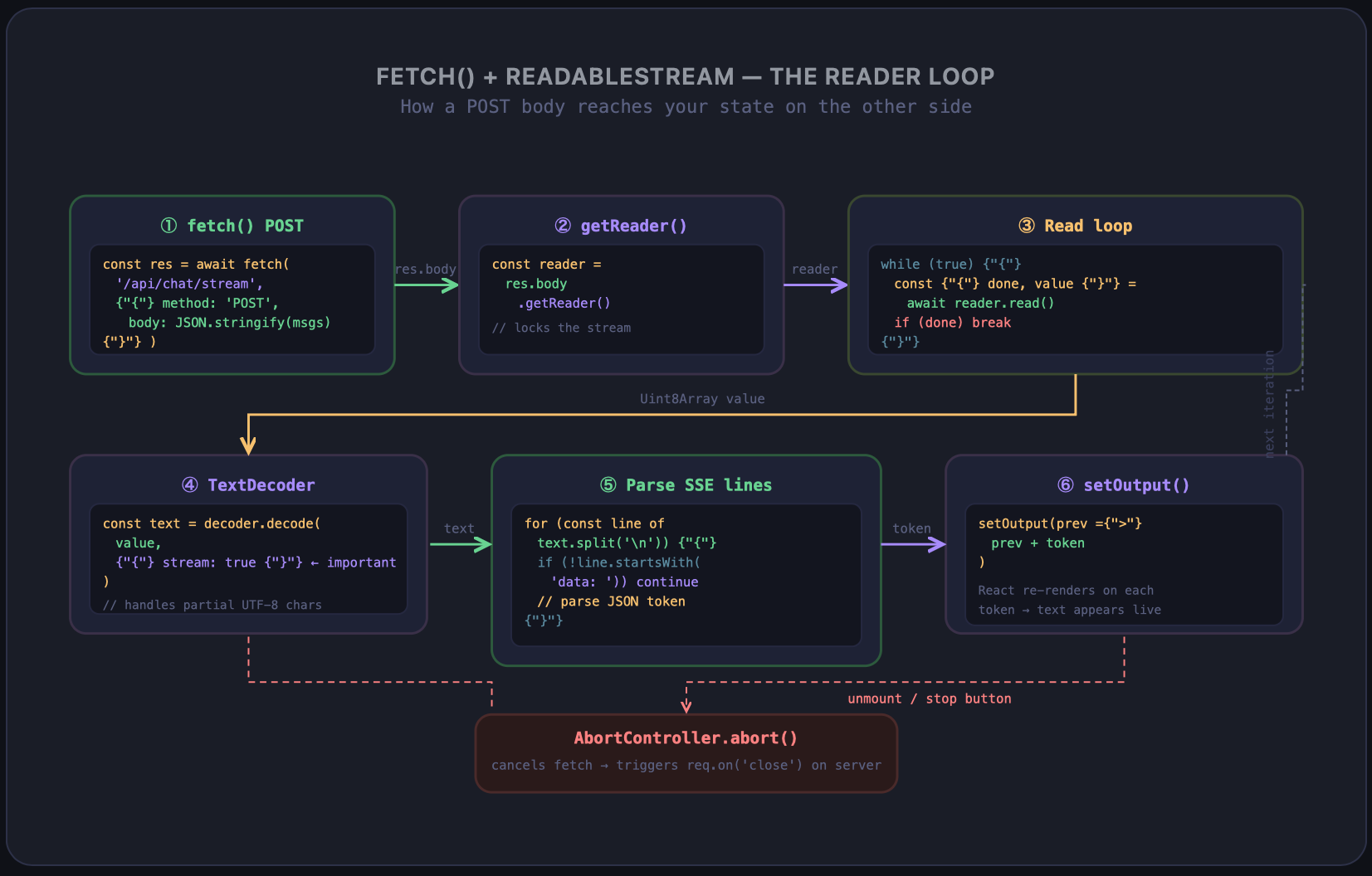
The decoder.decode(value, { stream: true }) call is subtle but important — setting stream: true tells the TextDecoder that this might be a partial character boundary, so it holds incomplete multi-byte characters until the next chunk arrives rather than outputting garbage.
The AbortController Pattern — Don't Skip This
Notice both examples use AbortController. This matters for two reasons: first, it stops the network request when a component unmounts so you don't update state on an unmounted component. Second, it signals your Express server (via req.on('close')) to cancel the upstream LLM call.
Without this, every navigation away from your chat page silently keeps a token-burning LLM generation running on the server until it completes naturally. In production that adds up fast.
// Clean abort on unmount
useEffect(() => {
  return () => abortRef.current?.abort();
}, []);
One line, but it closes a pretty leaky resource loop.
Putting It Together in a MERN App
The flow end-to-end looks like this:
React component calls
startStream(messages)fetch()opens a POST to your Express/api/chat/streamendpointExpress forwards the request to OpenAI with
stream: trueAs tokens arrive from OpenAI, Express writes them as SSE chunks
The
ReadableStreamreader on the frontend receives chunks and updates stateUser sees text appearing token by token — no spinner, no wait
If you want a stop button, stop() from the hook aborts the fetch, which triggers req.on('close') on the server, which aborts the OpenAI stream. The whole chain unwinds cleanly.
Wrap Up
Streaming isn't complicated once you see both sides of it. SSE on the server is basically res.write() in a loop with the right headers. On the client, EventSource handles the simple case and fetch + ReadableStream handles anything that needs a POST body. The AbortController wires the cancel path together so nothing leaks.
If your app makes any LLM calls or serves large data payloads, this pattern is worth wiring up — the UX difference between "wait 4 seconds, then see everything" and "see text appear immediately" is one of those things users notice immediately, even without being told what changed.