Your App Might Still Be Running the Polyfill.io Hack — Here's How to Check
In May 2026 — two full years after the polyfill.io supply chain attack made international headlines — researchers found over 61,000 pages still loading the compromised script. Two years. Sixty-one thousand pages. And that's just the ones they could find with a surface scan.
If you're building with React, Express, or any frontend that loads third-party JavaScript, there's a real chance one of your projects is in that group. Let's actually check, understand what happened, and talk about what the right polyfill strategy looks like in 2026.
What Actually Happened at polyfill.io
Quick context if you missed it: polyfill.io was a wildly popular CDN service that would deliver only the JavaScript polyfills a visitor's browser actually needed. You'd drop one script tag in your HTML:
<script src="https://cdn.polyfill.io/v3/polyfill.min.js"></script>
...and it would dynamically serve browser-specific polyfills. Clean, convenient, used by hundreds of thousands of sites.
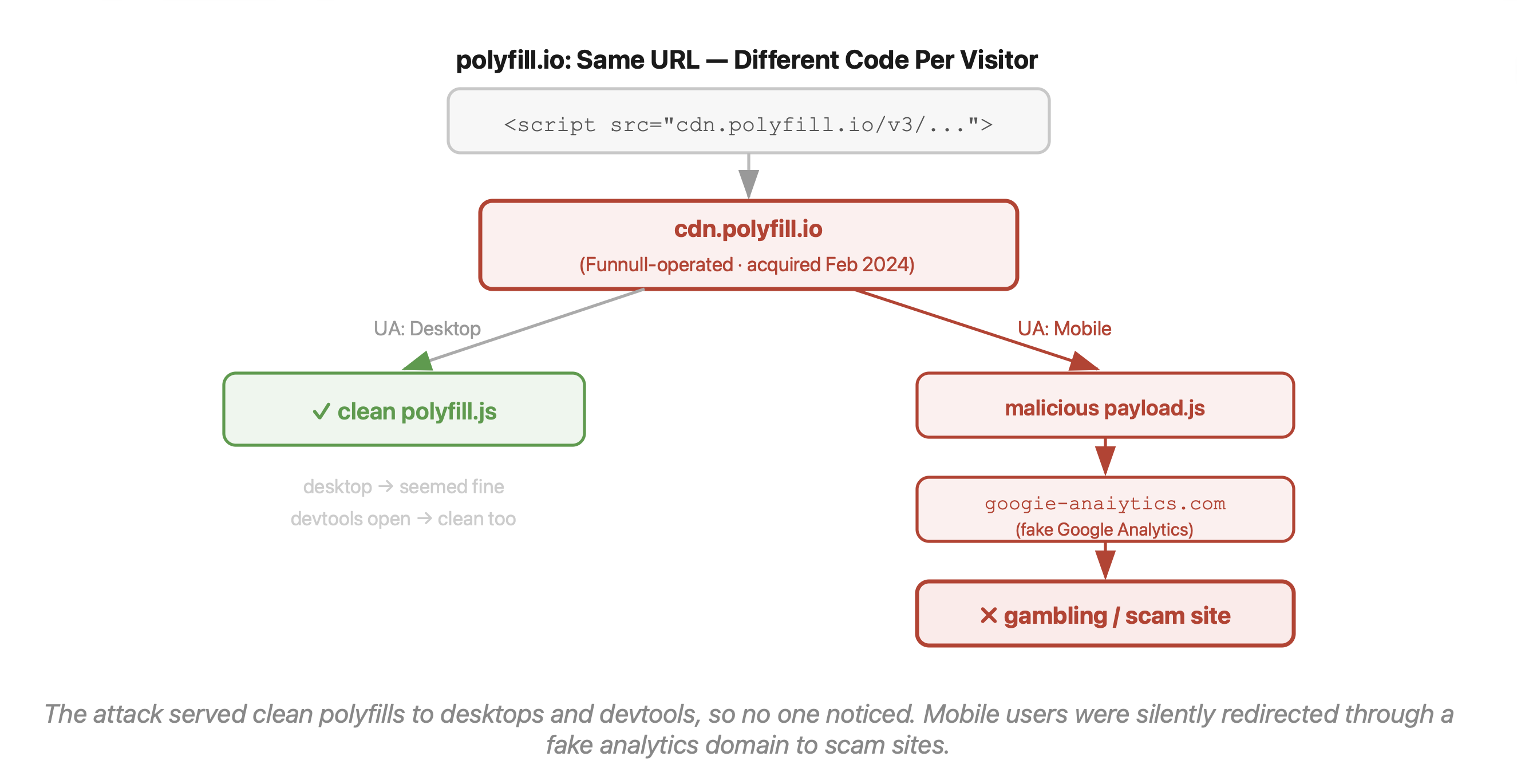
In February 2024, a Chinese company called Funnull acquired the domain and the GitHub repository. Andrew Betts, the original creator of the project, immediately posted a public warning: "If your website uses polyfill.io, remove it IMMEDIATELY." Most developers didn't see that tweet.
By June 2024, security researchers at Sansec confirmed the service was actively delivering malicious code. The real scale of exposure: 490,000+ websites according to cside's research. Over 384,000 affected hosts confirmed by an independent Censys scan.
How the attack actually worked
This is the part that's genuinely impressive from an adversarial engineering standpoint, even if the ethics are obviously terrible:
Mobile-only targeting. Desktop users saw perfectly normal, legitimate polyfill code. Mobile users got the payload. If you tested your site from your laptop — which basically every developer does — you saw nothing wrong.
Per-request variation. Each visitor got a slightly different version of the malicious script, making it nearly impossible to reproduce the behavior in a controlled environment.
Anti-detection logic. The payload wouldn't fire if it detected browser devtools open, if the visitor looked like a security researcher, or if analytics tools were crawling the page.
Single-hit delivery. Once a device was targeted, it wouldn't be targeted again — preventing the pattern from showing up in repeated audits.
The payload redirected mobile users to fake Google Analytics domains (things like googie-anaiytics[.]com) that led to gambling and scam sites. The OFAC eventually sanctioned Funnull in May 2025 and tied the operation to over $200 million in scam losses.
The reason traditional security tools missed it: the malicious code executed entirely client-side after your server already delivered the page. WAFs, intrusion detection systems, server-side scanners — all useless here. The script loaded from what appeared to be a legitimate domain, ran in the browser with full DOM access, and did its thing.
Step One: Check If You're Affected Right Now
Run this in your project root:
# Check source files
grep -r "polyfill.io" . --include="*.html" --include="*.js" --include="*.ts" --include="*.jsx" --include="*.tsx" --include="*.env*"

# Also check your package.json for any packages that bundle it
grep -r "polyfill.io" node_modules --include="package.json" -l

# Check your tag manager configs, CDN configs, or any CMS templates too
Beyond polyfill.io, the researchers flagged these related domains that were part of the same infrastructure:
bootcdn.net
bootcss.com
staticfile.net
staticfile.org
unionadjs.com
If you find any of these in a <script src> tag anywhere — in your HTML, your CMS templates, your tag manager — remove them today. Don't replace them with "safer mirror" equivalents. Just remove them.
And if you're building something with a React frontend backed by a Python AI API, or a Node.js microservices layer, or a Solidity/Web3 dApp that loads third-party JS — this applies to all of those front ends equally. The attack surface is the browser, not the server.
Do You Even Need Polyfills Anymore?
Probably not, and that's the part worth sitting with.
The features that used to require polyfilling — Array.flat, Object.fromEntries, Promise.allSettled, fetch, IntersectionObserver, optional chaining, nullish coalescing — all have 94–96%+ browser support globally in 2026. Most React applications targeting modern evergreen browsers are shipping unnecessary polyfills that do nothing except add bytes and, in the polyfill.io case, a third-party script execution risk.
Run a quick audit:
npx browserslist
This tells you what browsers your current browserslist config actually targets. If you see anything like > 0.5%, last 2 versions, not dead, you're probably shipping polyfills that 95% of your visitors don't need.
Then check what core-js is actually shipping into your bundle:
npm install --save-dev source-map-explorer
npx source-map-explorer 'build/static/js/*.js'
If you see a large chunk of core-js in the output, update your Babel config:
// babel.config.js — before (ships too much)
presets: [
  ['@babel/preset-env', {
    useBuiltIns: 'entry',   // loads everything based on browserslist
    corejs: 3,
  }]
]

// babel.config.js — after (ships only what's used)
presets: [
  ['@babel/preset-env', {
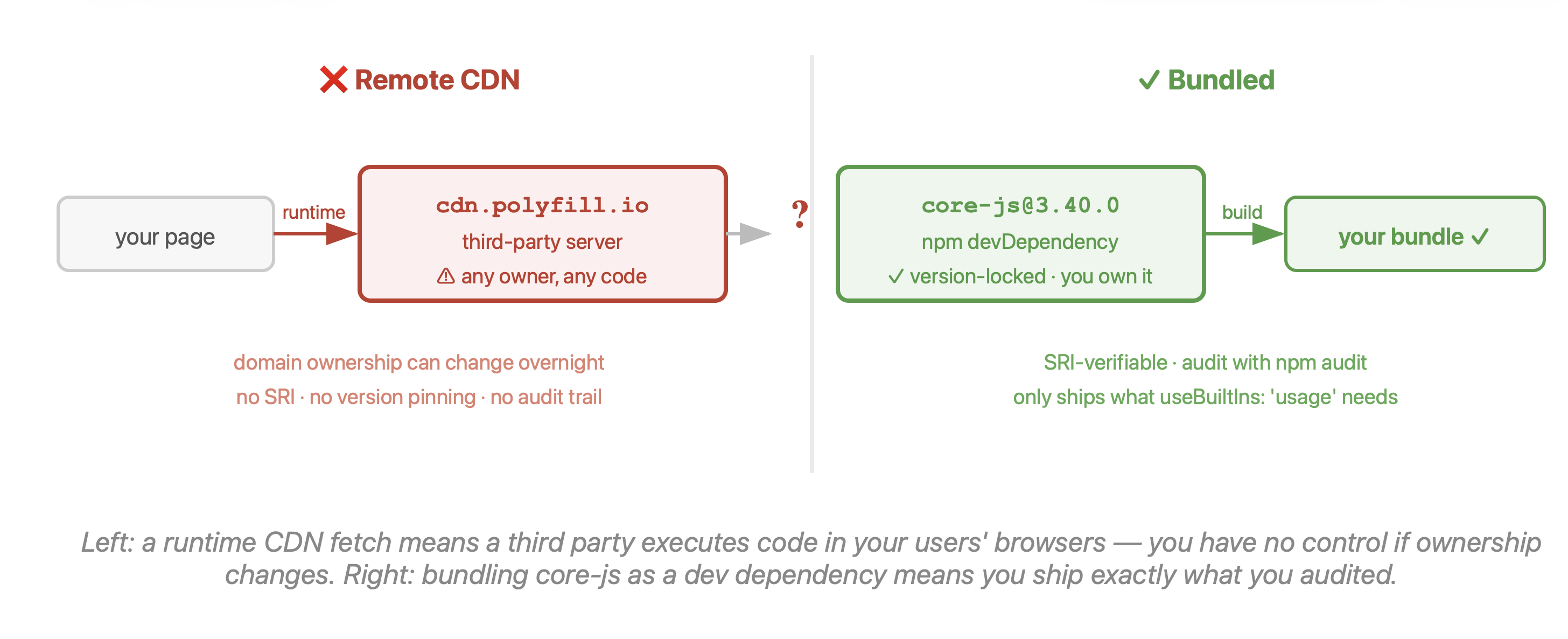
    useBuiltIns: 'usage',   // only includes what your code actually calls
    corejs: 3,
  }]
]
The 'usage' setting inspects your actual code and only includes polyfills for APIs you use, for browsers that don't support them. In most MERN projects in 2026, switching from 'entry' to 'usage' will cut your polyfill bundle significantly.
When You Genuinely Still Need a Polyfill
There are three legitimate scenarios in 2026:
1. Temporal API. Node 26 ships it by default, but browser support is still mid-rollout. If you're using Temporal in client-side code, you'll need a conditional polyfill while browser adoption catches up.
2. Decorators. Still no native browser implementation. If you're using decorators in your React or frontend TypeScript code (Angular devs, looking at you), a polyfill is genuinely necessary.
3. Locked enterprise environments. If your users are on corporate-controlled browsers that can't auto-update — think large enterprise clients, healthcare, government — you may be stuck supporting older runtimes.
For all of these: bundle the polyfill yourself. Don't load it from a CDN. Pull it into your build with npm, pin the version, and let your bundler handle it:
npm install core-js@3
If you absolutely must load something from an external URL, use Subresource Integrity:
<script
  src="https://cdn.example.com/specific-polyfill.min.js"
  integrity="sha384-<hash-here>"
  crossorigin="anonymous"
></script>
The integrity attribute tells the browser to reject the script if its hash doesn't match the one you specified at deploy time. This wouldn't have helped against polyfill.io (because the domain itself was compromised and the hash would've matched whatever code they served), but it's a valid defense layer against CDN content injection from otherwise-trusted providers.
Add a Content Security Policy to further restrict which domains can execute scripts:
Content-Security-Policy: script-src 'self' https://your-trusted-cdn.com
The Bigger Lesson
The polyfill.io incident is a case study in a specific and underrated risk: what happens when a trusted domain changes ownership. Your security review might have approved cdn.polyfill.io two years ago. That approval is now meaningless because the thing at that URL is completely different.
The same risk applies to any third-party script your app loads. Tag managers, analytics libraries, chat widgets, A/B testing tools — all of them have this surface. The question isn't just "is this script trusted today?" It's "what's the approval process if this domain is sold tomorrow?"
Runtime monitoring (tools that watch actual script behavior in real user sessions, not just audit the deploy pipeline) and strict Content Security Policies are the structural answers. But the immediate answer is: audit your script tags today, remove polyfill.io and its associated domains, and take a hard look at whether you're shipping polyfills you don't actually need.
The browsers have grown up. Most of your polyfills haven't needed to exist for a while now.
About the author
- Love to code, gaming. And I use vim btw.
Comments
Join the discussionNo comments yet. Be the first to comment.