Your Backend Is Probably Dying Wrong — Here's How to Fix It

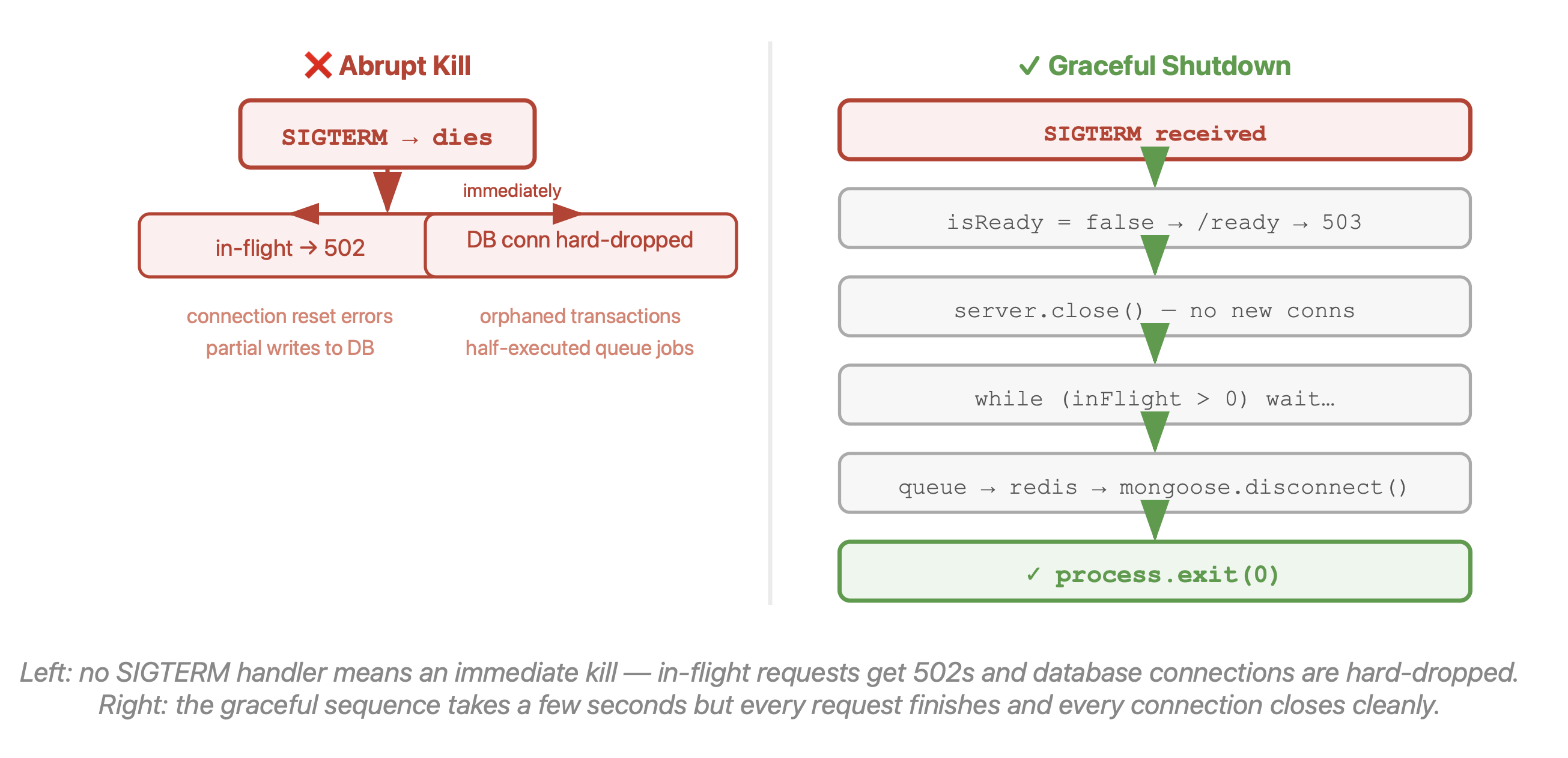
Every time you deploy a new version of your Express API, your old pod gets killed. That's fine — that's just how deployments work. The question is how it dies. Most backends die like they got hit by a truck: mid-request, mid-database-write, mid-queue-job. The requests in flight at the moment of shutdown get a 502 or an abrupt connection reset, and if you're lucky, nobody notices. If you're unlucky, a user's checkout flow breaks or a payment job only half-executes.
Graceful shutdown is the thing that separates "zero-downtime deployment" from "zero-downtime deployment (usually)". Here's what it actually involves.
What Kubernetes Actually Does When It Kills Your Pod
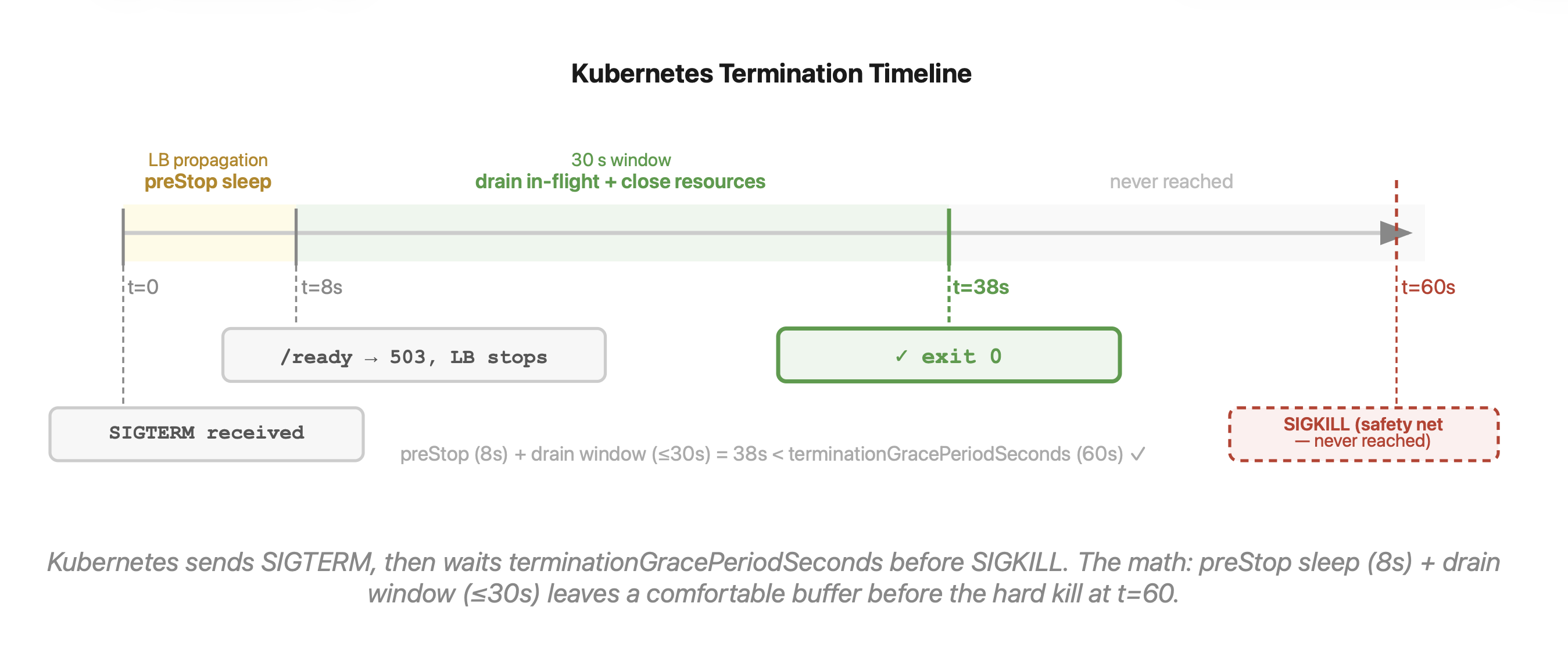
When Kubernetes decides to terminate a pod — whether because you just deployed a new version, scaled down, or evicted a node — it doesn't immediately kill the process. It sends a SIGTERM signal, waits for terminationGracePeriodSeconds (default: 30 seconds), and then sends SIGKILL if the process is still alive.
Most Node.js apps never register a handler for SIGTERM. So the OS default kicks in, which is immediate termination — exactly like a SIGKILL. All those in-flight requests? Gone. Any database transactions in progress? Depends on your DB driver, but probably not cleanly rolled back.
The good news is that 30 seconds (or 60, if you configure it) is more than enough time to shut down cleanly. You just need to actually use it.
The Shutdown Sequence That Actually Works
Here's the order of operations, and the order matters:
1. Flip the readiness flag Your /health or /ready endpoint should return 503 immediately. Kubernetes' readiness probe will detect this, remove the pod from the load balancer's endpoint list, and stop routing new traffic to it.
2. Wait 5–10 seconds The readiness probe fires on an interval (typically every 5 seconds), and there's propagation delay through the load balancer. If you start rejecting connections before the LB knows you're gone, requests still get routed to you and hit a wall. A short sleep in a preStop lifecycle hook handles this.
3. Stop accepting new connections Call server.close(). This closes the listening socket so no new TCP connections can be established. Existing connections stay open.
4. Drain in-flight requests This is the part most implementations miss. Keep-alive connections stay open even after server.close(), and any request that arrives on one will just hang. You need to track active requests with middleware and wait for them all to finish.
5. Close resources in reverse dependency order Your app opened resources in a certain order — message queue connection, Redis, MongoDB. Close them in reverse: queue first (so no new jobs get picked up), then cache, then database last.
6. Exit cleanly — with a hard timeout safety net Call process.exit(0). But also set a hard timeout (30 seconds is reasonable) that calls process.exit(1) if cleanup somehow stalls. You never want a broken shutdown to block indefinitely.
Express / Node.js Implementation
// server.js
import express from 'express';
import mongoose from 'mongoose';

const app = express();
let isReady = true;
let inFlight = 0;

// Track in-flight requests + reject new ones during shutdown
app.use((req, res, next) => {
  if (!isReady) {
    return res.status(503).json({ error: 'Service shutting down' });
  }
  inFlight++;
  res.on('finish', () => inFlight--);
  next();
});

// Readiness probe
app.get('/ready', (req, res) => {
  res.status(isReady ? 200 : 503).send(isReady ? 'ok' : 'shutting down');
});

const server = app.listen(3000, () => console.log('Server up'));

async function shutdown(signal) {
  console.log(`${signal} received — shutting down`);

  // Hard timeout safety net (Kubernetes won't wait forever)
  const hardTimer = setTimeout(() => {
    console.error('Shutdown timed out — forcing exit');
    process.exit(1);
  }, 30_000);
  hardTimer.unref(); // don't let this keep the event loop alive

  // 1. Stop accepting new traffic
  isReady = false;

  // 2. Stop accepting new connections
  server.close();

  // 3. Wait for in-flight requests to finish
  while (inFlight > 0) {
    await new Promise(resolve => setTimeout(resolve, 100));
  }

  // 4. Close resources (reverse dependency order)
  await mongoose.disconnect();
  console.log('Clean exit');
  process.exit(0);
}

process.on('SIGTERM', () => shutdown('SIGTERM'));
process.on('SIGINT',  () => shutdown('SIGINT'));
One thing to know: server.close() won't kill existing keep-alive connections. If you have long-lived idle connections in your pool, you either need to track them manually and call .destroy() on idle ones, or use the stoppable package which wraps your server and handles this automatically:
import stoppable from 'stoppable';
const server = stoppable(app.listen(3000), 10_000); // 10s grace for connections
Python / FastAPI — Same Idea, Different Syntax
If you're running a FastAPI service — common for AI inference endpoints backed by a MERN frontend — the pattern is the same:
# main.py
import signal, asyncio
from fastapi import FastAPI
from fastapi.responses import JSONResponse

app = FastAPI()
ACCEPTING_TRAFFIC = True
active_tasks = 0

@app.get("/ready")
def readiness():
    status = 200 if ACCEPTING_TRAFFIC else 503
    return JSONResponse({"ready": ACCEPTING_TRAFFIC}, status_code=status)

@app.post("/predict")
async def predict(payload: dict):
    global active_tasks
    if not ACCEPTING_TRAFFIC:
        return JSONResponse({"error": "shutting down"}, status_code=503)
    active_tasks += 1
    try:
        # ... your inference logic
        return {"result": "..."}
    finally:
        active_tasks -= 1

def handle_sigterm(signum, frame):
    global ACCEPTING_TRAFFIC
    ACCEPTING_TRAFFIC = False
    # Wait for in-flight work to drain, then exit
    async def drain_and_exit():
        while active_tasks > 0:
            await asyncio.sleep(0.1)
        raise SystemExit(0)
    asyncio.create_task(drain_and_exit())

signal.signal(signal.SIGTERM, handle_sigterm)
The same principle applies to any blockchain transaction-signing service. An abrupt kill mid-signature is exactly the kind of half-baked state you can't reliably recover from — graceful shutdown gives you a window to either complete or cleanly abort and rollback.
Kubernetes Config That Matches
Your Kubernetes deployment needs to match the timing of your app's shutdown sequence:
spec:
  terminationGracePeriodSeconds: 60  # total time before SIGKILL

  containers:
    - name: api
      lifecycle:
        preStop:
          exec:
            command: ["/bin/sleep", "8"]  # wait for LB propagation before SIGTERM
      readinessProbe:
        httpGet:
          path: /ready
          port: 3000
        periodSeconds: 5
        failureThreshold: 1
The math here: preStop sleep (8s) + your app's max shutdown time (≤20s) should be comfortably under terminationGracePeriodSeconds (60s). If you set the grace period too short, Kubernetes sends SIGKILL before your app finishes draining, which defeats the whole point.
What You Actually Gain
Once this is wired up, rolling deployments become genuinely zero-downtime. Kubernetes can drain and kill pods while new ones spin up and pass readiness checks — users never see a 502. Your database connections close cleanly instead of being hard-dropped. Your message queue consumers stop picking up new jobs before they exit, so jobs don't vanish mid-processing.
It's also not that much code. The core pattern — signal handler, in-flight counter, server.close(), resource teardown — is maybe 30 lines. Most projects don't have it because nobody thinks about it until they have a bad deploy. Don't wait for the bad deploy.
If you're running in Docker without Kubernetes, the same applies: docker stop sends SIGTERM before docker kill. Handle it, and your container restarts become clean.